An access review process is a recurring, owner-attested certification campaign that verifies entitlement-to-role alignment, removes unnecessary access, and produces auditable proof of remediation. The goal is least privilege you can prove, not just claim.
Every mature program runs four phases: scoping (deciding which systems and accounts matter), data collection (pulling entitlements from every identity source), role comparison (checking who has what against who should have what), and attestation (getting a human owner to sign off), followed by remediation when something doesn’t check out. Skip any one of these and you get a review in name only, which is exactly what auditors flag first.
If you do nothing else this quarter, run this: pick your three highest-risk systems (usually your identity provider, your financial or EHR platform, and anything holding customer data), pull a current entitlement list, and route it to the actual business owner of each system for sign-off within 30 days. That single campaign, documented, gives you a defensible answer the next time an auditor or insurer asks how you’re managing access.
- Define scope: which systems, which accounts, which sensitivity tier
- Collect and reconcile entitlement data across sources
- Compare entitlements to defined roles and flag mismatches
- Route to resource owners for attestation, with a documented default action on nonresponse
According to ISACA, the four-phase structure of scoping, role comparison, attestation, and remediation is the backbone auditors expect to see documented, decision by decision.
Key Takeaways
An effective access review process depends on delegated resource-owner attestation, risk-tiered cadence, and documented evidence, not on tooling alone.
| Point | Details |
|---|---|
| Four-phase structure | Every review needs scoping, data collection, role comparison, and attestation before remediation. |
| Owners attest, not IT | Resource owners understand business context and produce more accurate decisions than IT alone. |
| Cadence follows risk | Review privileged accounts monthly or quarterly; standard apps can run semiannually. |
| Evidence must be packaged | Attestation logs, entitlement snapshots, and ticket IDs together satisfy auditor requests. |
| ArchiTECH MSP manages the program | ArchiTECH MSP folds access review governance into its six-step security framework for SMBs. |
The 30/90/180-Day Access Review Process Checklist
You don’t need a fully mature identity governance program to start reducing risk this month. You need a sequence.
- Days 1 to 30: Inventory every system with login credentials, tag each by data sensitivity, and run a manual attestation campaign on your top three highest-risk platforms. Capture reviewer name, decision, timestamp, and justification for every “keep” or “revoke.”
- Days 30 to 90: Extend the campaign to all business-critical apps. Bring in resource owners (not just IT) as the primary reviewers, and stand up a simple ticketing link between “revoke” decisions and your help desk queue so remediation doesn’t die in someone’s inbox.
- Days 90 to 180: Automate what you can. Turn on scheduled reminders, auto-expiry for dormant accounts, and recommended decisions if your identity platform supports them. Layer in event-driven triggers for offboarding and role changes so you’re not waiting for the next scheduled cycle to catch a departed employee’s active account.
Who to involve at each stage matters more than most teams assume. IT can pull the data, but the department manager or system owner should make the call on whether access still makes sense. Capture that decision in writing every time.
Pro Tip: Turn on auto-expiry for guest and contractor accounts first. It’s the single fastest win because nobody has to review anything, the access just ends on schedule unless someone actively extends it.
How Do You Run an Access Audit Procedure Step by Step?
This is the part most guides gloss over, and it’s where compliance officers actually lose sleep. Here’s the operational sequence, phase by phase.
Scoping: deciding what’s actually in play
Start by classifying every system into a sensitivity tier: privileged infrastructure (domain admins, cloud root accounts), regulated data systems (EHR, payment processing, case management), standard business apps, and low-risk tools. The NIST Cybersecurity Framework gives you a control mapping structure for this kind of risk-based prioritization, and it’s worth using even informally, just to justify why your quarterly reviews focus where they do.
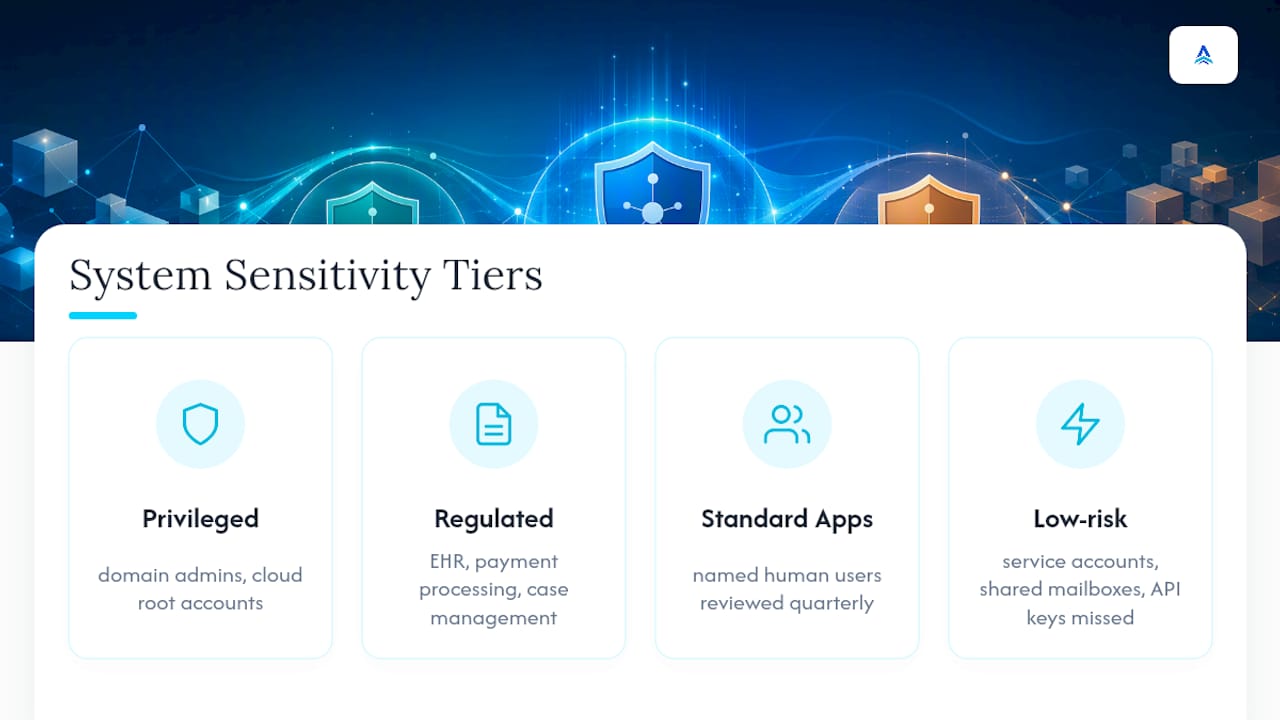
Write explicit inclusion and exclusion rules. Service accounts, shared mailboxes, and API keys get missed constantly because teams default to reviewing only named human users. Decide up front whether those count, and document the decision so nobody has to guess next cycle.
Collecting and correlating access data
Pull raw entitlement exports from every identity source: your directory (Active Directory or Entra ID), your SaaS apps with local role assignments, your VPN or remote access tooling, and any system with its own login database that doesn’t sync to your central directory. This last category is where privilege creep hides. A finance app with its own permission table, untouched since onboarding three years ago, is a classic finding.

Reconciliation is the unglamorous part that makes the review credible. When your directory says someone is in the “Finance” group but the accounting platform still lists them as an admin from a role they left two years ago, you have a conflict that needs resolving before attestation, not during it. A practical fix: add a reconciliation column to your dataset that flags mismatches and requires a documented justification before anyone signs off on keeping access.
Mapping entitlements to roles
Once you have clean data, compare actual entitlements against a defined role baseline. If you don’t have formal role definitions yet, build a lightweight version: list the five or six job functions with the most access, and note what each should have. Anything beyond that baseline is a candidate for review, whether or not it’s technically “wrong.” Privilege creep rarely looks like a smoking gun. It looks like someone who moved teams eighteen months ago and never lost their old group memberships.
Designing the attestation campaign
This is where most programs either build trust or lose it. A few design decisions determine whether reviewers actually engage or just click “approve all”:
- Reviewers: the resource owner, not IT, for anything outside pure infrastructure
- Cadence: tied to risk tier, covered in more detail further down
- Reminders: at least two automated nudges before escalation
- Default action on nonresponse: decide this in advance. Microsoft’s Entra ID Governance guidance recommends defining resources, subjects, frequency, and the automated action on nonresponse before you ever launch the campaign, precisely because undefined defaults are what let reviews stall indefinitely.
A documented default matters more than people expect. If a manager ignores three reminders, does access auto-expire, escalate to their boss, or get flagged “needs review” for manual follow-up? Pick one, write it down, and apply it consistently. Inconsistent enforcement is one of the fastest ways to lose credibility with your own leadership when someone asks why one employee’s stale access got pulled and another’s didn’t.
Remediation: automated versus manual
Low-risk revocations (a departed contractor’s SharePoint access, a dormant SaaS seat) can often be automated directly through your identity platform. High-risk changes, especially anything touching privileged accounts or regulated data, should route through a change ticket in your ITSM system, with a named approver and a rollback plan in case the access turns out to be legitimately needed. Nothing kills trust in a review program faster than revoking someone’s access mid-project because a form was misread.

Closeout and proof-of-control
Package the campaign’s results before you move on: attestation logs, before-and-after entitlement snapshots, the ticket IDs for every remediation, and a one-page summary for management. This closeout packet is what you hand an auditor eighteen months later when they ask you to prove the Q2 review actually happened and actually changed something.
Who Should Own Access Reviews: IT or Business Owners?
The single biggest predictor of whether an access review catches real problems is who’s doing the reviewing. IT staff can tell you what access exists. They usually cannot tell you whether a regional sales manager still needs edit rights to a contract repository three departments away. That judgment call belongs to the resource owner.
ISACA’s guidance is direct on this point: delegated accountability to resource owners produces better decisions than routing everything through IT, because owners understand business context that IT simply doesn’t have visibility into. An IT admin reviewing a list of forty names has every incentive to click “approve all” and move on. A department head reviewing their own team’s access has a reason to actually look.
That said, IT and security still play a real role. They:
- Own the technical scoping and data extraction
- Build and maintain the reconciliation logic across systems
- Enforce the default action when reviewers go silent
- Escalate anomalies that owners might not catch, like a service account with domain admin rights
Fallback rules matter too. If a resource owner leaves the company or goes on extended leave mid-campaign, ownership should transfer automatically to a defined backup, usually their manager, not sit unresolved. Build that escalation path before your first campaign, not after your first stalled one.
HR and internal audit belong in the loop before remediation touches anyone’s employment status. If a review surfaces access tied to someone under investigation or in a sensitive HR situation, coordinate before you pull the trigger. This is also where rubber-stamping gets caught: internal audit periodically sampling completed attestations, checking whether “approve all” clicks correlate suspiciously with campaign completion times, keeps the whole process honest.
Pro Tip: Spot-check five percent of “approved” attestations each cycle by asking the reviewer to explain, in one sentence, why the access is still needed. If they can’t answer in under ten seconds, you’ve found your rubber-stampers.
What Automation and Tools Do Access Reviews Need?
Manual, spreadsheet-driven reviews work for a company with forty employees and three systems. They collapse the moment you cross a few hundred accounts across a dozen apps. The fix isn’t necessarily an enterprise governance suite. It’s targeted automation aimed at the parts of the process that don’t need human judgment.
Automate first:
- Scheduling and recurring campaign launches
- Reminder emails to reviewers who haven’t responded
- Recommended decisions based on usage data (has this account logged in during the review period?)
- Auto-expiry for guest, contractor, and clearly dormant accounts
Microsoft’s Entra ID Governance documentation notes that access reviews support both recurring and ad-hoc campaigns with reviewer delegation and recommended decisions, letting privileged roles get certified more frequently without multiplying the manual workload on reviewers.
When evaluating any platform, require these connectivity features before you commit budget: SCIM support for provisioning sync, native connectors to your identity provider, Microsoft Graph API access if you’re in a Microsoft 365 environment, and audit logging that timestamps every decision. Without that logging, you’re back to manually screenshotting approval emails for your evidence file.
Watch the licensing traps. Microsoft’s governance-tier features, including some access review automations, require Entra ID Governance or P2 licensing, which is a real cost jump for a small IT budget. If enterprise governance licensing isn’t in the cards yet, Drata’s guidance on SMB access reviews points to a workable middle path: scripted exports, scheduled API pulls, and ITSM integration can get you audit-ready remediation tracking without the full governance suite price tag. For organizations already running Microsoft 365 or Azure, cloud identity integration is usually the fastest place to start, since your directory data is already centralized.
How Often Should You Run Access Reviews?
Cadence should track risk, not the calendar convenience of a quarterly compliance meeting. A flat “review everything once a year” policy either over-reviews your low-risk apps or, more dangerously, under-reviews your privileged accounts.
- Privileged accounts (domain admins, cloud root, database admins): monthly or quarterly at minimum
- High-risk applications (EHR, payment systems, financial platforms): quarterly
- Standard business applications: semiannually
- Guest and third-party accounts: monthly, ideally automated via expiry rather than manual review
Microsoft’s access review documentation confirms this risk-tiered approach directly: recurring reviews can run weekly, monthly, quarterly, or annually, but privileged roles typically warrant the tightest recertification cycle.
Layer event-driven reviews on top of the schedule, not instead of it. Always trigger an ad-hoc review on employee offboarding, a role change or internal transfer, and immediately following any confirmed security incident. Waiting for the next quarterly cycle to remove a departed employee’s access is how stale accounts turn into breach headlines.
Bundle related systems into the same campaign window where you can. Reviewing your CRM and your marketing automation platform in the same cycle, since they usually share the same user population, cuts reviewer fatigue without weakening coverage.
What Audit Evidence Do Access Reviews Need to Produce?
Auditors don’t want your process description. They want proof it happened and proof it worked. That distinction shapes exactly what you should be logging from day one.
The minimum evidence set, per ISACA’s step-by-step framework, includes the attestation record itself, before-and-after entitlement snapshots, the remediation ticket or change record ID, and the reviewer’s identity with a timestamp.
Every remediation should link back to a ticket in your ITSM system. When access gets revoked, that ticket should record what was removed, who approved it, and when it took effect. This linkage is what turns “we said we’d fix it” into “here’s proof we fixed it.”

| Evidence element | What it should contain |
|---|---|
| Attestation record | Reviewer name, decision, timestamp, justification for each entitlement |
| Entitlement snapshot | Access state captured before and after the review cycle |
| Remediation ticket | Ticket ID, action taken, approver, completion timestamp |
| Summary report | One-page rollup for management: scope, findings, exceptions, closure rate |
Retention matters as much as content. PCI DSS v4.0’s log monitoring guidance raises the bar on automated monitoring and requires organizations to show that alerts were actually investigated, not just generated, which ties directly into how long you keep access review logs and how defensible your triage trail looks. Healthcare organizations handling PHI face a parallel expectation under HIPAA’s audit control requirements, where documented access reviews tied to specific systems and timeframes are what examiners ask for first. Store completed campaign packets for at least the length of your compliance framework’s retention window, typically one to seven years depending on the regulation, and keep them somewhere searchable, not buried in an inbox.
Which KPIs Prove Your Access Review Program Works?
Numbers convince leadership and auditors faster than a narrative ever will. Track these five:
- Percent complete: proportion of assigned reviews completed by the deadline
- Median time-to-remediate: typical duration from flagged access to actual revocation
- Privileged-account coverage: extent of privileged accounts reviewed each cycle (aiming for as many as possible)
- Exception rate: proportion of attestations resulting in a “keep with justification” compared to clean approvals
- Reviewer response rate: proportion of reviewers responding before the first automated escalation
A rising exception rate isn’t necessarily bad news. It often means reviewers are actually reading the access instead of rubber-stamping it. A stalled time-to-remediate metric, on the other hand, is the number that tends to draw the sharpest audit questions, since it exposes the gap between “identified” and “fixed.”
What ArchiTECH MSP Has Learned Running Access Reviews for SMBs
Access review programs fail for a boring reason: nobody assigns clear ownership until an audit forces the question. ArchiTECH MSP built its six-step security framework around avoiding that scramble, with compliance evidence, including access attestation, generated continuously rather than assembled the week before an assessment.
For a constrained internal team, the advice is simple: automate the mechanical parts first (scheduling, reminders, auto-expiry on dormant accounts) and keep human judgment focused on privileged roles and regulated data systems. Don’t try to build a full governance suite before you’ve proven the manual process works on your three riskiest applications. Get that right, then scale the automation around it.
Get Audit-Ready Access Reviews Without Building an Internal Governance Team
Running a compliant access review program in-house means someone owns scoping, data reconciliation, reviewer follow-up, and evidence packaging every single cycle, on top of their existing workload. ArchiTECH MSP exists so that burden doesn’t fall entirely on a stretched IT team. As a security-first managed provider built around a structured six-step framework, ArchiTECH MSP handles the governance layer, including scheduled attestation campaigns, remediation tracking, and audit-ready documentation, for HIPAA, PCI, and CMMC environments alike.
ArchiTECH MSP’s managed cybersecurity services fold access review governance into the same monthly engagement covering monitoring, patching, and incident response, so you’re not stitching together separate tools and vendors to prove least privilege. If you want a clear picture of where your current access controls stand before committing to anything, start with the free cybersecurity assessment. It identifies your highest-risk systems and gaps in current review coverage, and gives you a concrete starting point instead of a generic checklist.
Frequently Asked Questions
How long should an access review process take to complete for a mid-sized company?
A well-scoped quarterly campaign covering your highest-risk systems typically runs two to four weeks from launch to closeout, including reminder cycles and remediation. Annual reviews covering every system in the organization can take longer, which is exactly why risk-tiered, smaller recurring campaigns tend to work better than one massive yearly sweep.
What’s the difference between a user access review and a broader identity access management program?
A user access review is a point-in-time or recurring certification activity, essentially an audit checkpoint. Identity access management is the ongoing infrastructure, provisioning, deprovisioning, role definitions, that access reviews check against. You need both: IAM sets the rules, and the review confirms reality still matches them.
Do PCI log retention requirements apply directly to access review records?
PCI’s log monitoring requirements govern system and security logs specifically, but the same retention discipline applies to access review evidence in PCI environments. If you’re subject to PCI’s daily monitoring guidance, keep attestation records and remediation tickets retrievable for the same window your QSA expects for log data, generally at least twelve months readily accessible.
How does HIPAA log retention intersect with access reviews for healthcare organizations?
HIPAA’s audit control standard expects covered entities to maintain records showing who accessed protected health information and when, which makes access review attestation logs part of your broader audit trail. Healthcare practices should align access review retention with their existing HIPAA documentation policy rather than treating it as a separate requirement.
Can small businesses run an effective access review process without enterprise identity governance software?
Yes. A combination of scheduled data exports, a shared tracking sheet with reconciliation logic, and a ticketing system for remediation can produce audit-acceptable evidence, provided the process is consistent and documented every cycle. The evidence quality matters more to auditors than the tooling sophistication behind it.
Sources
A handful of primary sources cover the standards, implementation details, and audit expectations behind everything in this guide.
- User Access Review Verification: A Step-by-Step Guide — ISACA Now (2024)
- Deploy access reviews — Microsoft Entra ID Governance (2026)
- Effective Daily Log Monitoring Guidance — PCI SSC
Recommended
- HIPAA IT Requirements: A Guide for MA Healthcare Practices | ArchiTECH MSP
- How to Choose a Managed IT Provider in MA | ArchiTECH MSP
- CMMC 2.0: What Cape Cod Defense Contractors Need to Know | ArchiTECH MSP
- IT Services & Cybersecurity | ArchiTECH MSP | New Bedford