Most small and mid-sized businesses in the U.S. pay between $100 and $250 per user per month for managed IT services, with the spread driven almost entirely by how much security and compliance work is baked into the contract. Entry-level plans run in the $100 to $150 per user range. Mid-tier plans, the sweet spot for most companies with any regulatory exposure, typically range between $150 and $200. Premium, security-heavy plans with 24/7 monitoring and compliance support usually exceed $200, sometimes reaching around $250 or more.
Here’s the fast way to sanity-check any number a vendor throws at you: estimated monthly cost = headcount × per-user rate, then add device coverage and any compliance add-ons on top. For a detailed guide on budgeting your small business IT expenses, see Small Business IT: What to Budget and How to Decide. A 20-person firm shopping mid-tier plans should expect a baseline around $3,000 to $4,000 a month before extras.
Quick Benchmark: A 15-person company with no special compliance needs typically lands at $1,500 to $3,000 per month for solid managed IT. Add HIPAA or PCI requirements, and that same headcount can push toward $2,000 to $3,750.
A few things move that number more than anything else:
- Whether you need HIPAA, PCI, or CMMC compliance support baked in
- How many devices per employee (laptops, phones, and desktops all count)
- Whether you want 24/7 coverage or business-hours-only response
- How many on-site visits or legacy servers you’re still running
If you read nothing else in this piece, read this: the cheapest quote is rarely the right one once you factor in what it doesn’t cover.
Key Takeaways
Managed IT services pricing scales primarily with security and compliance scope, not just headcount, making per-user rates between $100 and $250 the realistic U.S. benchmark for 2026.
| Point | Details |
|---|---|
| Know your baseline range | Budget $100 to $150 per user for entry tier, $150 to $200 for mid tier, and $200 to $250+ for premium security and compliance coverage. |
| Compliance changes the math | HIPAA support commonly adds $15 to $30 per user monthly, so factor regulatory needs in before comparing quotes. |
| Separate onboarding from ongoing costs | Ask every vendor for a first-year versus steady-state breakdown since migration work often adds 20 to 40 percent to year one. |
| Match tier to risk, not price | Choosing the lowest bid without weighing compliance and incident response needs tends to cost more after a breach or audit. |
| Get a security-first assessment | ArchiTECH MSP’s free cybersecurity assessment shows exactly which tier fits your risk profile before you sign a contract. |
Managed IT Services Pricing Snapshot: The Numbers You Need First
Before you get lost in proposals and sales calls, it helps to know what “normal” looks like. Here’s the reference sheet I’d hand a client who just asked, “What’s this supposed to cost?”
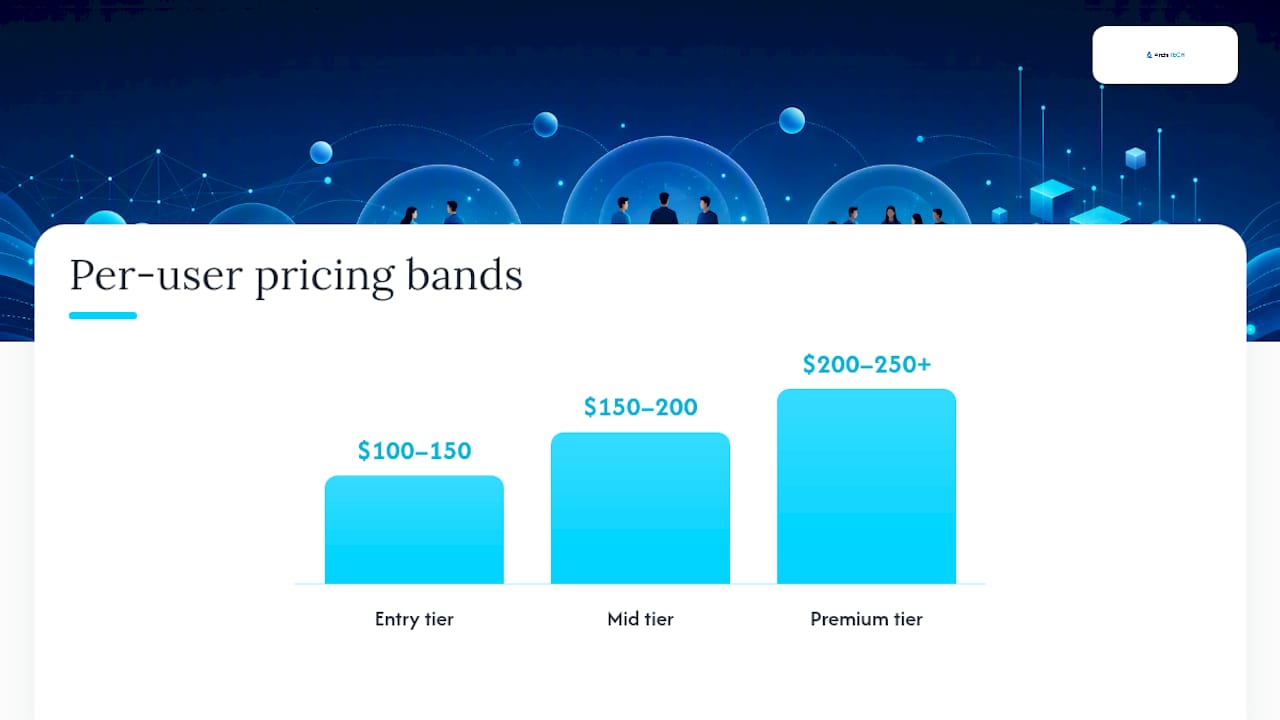
Per-user pricing is the most common structure for full-service managed IT, and it breaks into three rough bands:
- Entry tier: $100–$150 per user/month. Basic help desk, patching, antivirus, and remote support. Fine for a low-risk business with no compliance obligations.
- Mid tier: $150–$200 per user/month. Adds proactive monitoring, better endpoint detection, backup management, and faster response windows.
- Premium tier: $200–$250+ per user/month. Full security stack, compliance support for frameworks like HIPAA or PCI, 24/7 SOC monitoring, and incident response on standby.
Per-device pricing works differently and tends to show up when a company’s device count doesn’t map cleanly to headcount, think shared workstations or a server room that needs its own line item. Typical costs run about $100 per workstation and roughly $200 per server per month. This model can get expensive fast if your staff each juggle a laptop, a desktop, and a phone, since some MSPs will bill each as a separate device.
Flat-rate or “all-you-can-eat” pricing bundles unlimited support tickets and services into one number regardless of usage. It’s economical for businesses with unpredictable support volume, think a law office that’s quiet for weeks then floods the help desk during a case crunch, but it can mask underlying costs if the flat fee doesn’t scale with headcount growth.
Onboarding and project work almost always sit outside the monthly fee. Discovery and migration work commonly runs from several hundred to several thousand dollars depending on complexity, and hourly project rates generally fall within a range around $125 to $200. Budget for this separately. Year one is not the same bill as year two.
How Different Managed Services Pricing Models Actually Work
Not every MSP prices the same way, and the model matters almost as much as the rate. Here’s what you’re actually choosing between:
-
Per-user pricing. You pay a flat rate for every employee, regardless of how many devices they touch. A 30-person firm at $175/user pays $5,250/month, full stop. This model dominates SMB contracts because it’s predictable, and predictable is what a business owner wants when budgeting twelve months out.
-
Per-device pricing. You pay per workstation, laptop, and server. This fits companies with more hardware than headcount, like a manufacturer running shared shop-floor terminals, but it punishes businesses where employees use multiple devices each.
-
Tiered pricing. Bronze, Silver, Gold, whatever the vendor calls it, tiered plans bundle a fixed set of services at each level. You get predictability in exchange for less flexibility. If your Silver plan doesn’t include dark-web monitoring and you need it, you’re either upgrading the whole tier or paying an a la carte add-on.
-
All-you-can-eat pricing. One flat fee, unlimited tickets. Good for volatile support needs, risky if the provider hasn’t priced in your actual usage pattern.
-
Monitoring-only pricing. A lighter, cheaper model where the MSP watches your systems and alerts you to problems but doesn’t handle day-to-day help desk work. This suits companies with an internal IT person who wants a safety net, not a replacement.
-
A la carte pricing. You buy individual services (backup, email security, patching) separately. Flexible, but it requires you to know exactly what you need, and most business owners don’t, which is where hidden gaps creep in.
Per-user models favor predictable budgeting, which is exactly why they’re the default for full-service SMB contracts. Per-device and a la carte tend to fit narrower use cases, like a company with heavy hardware or an internal team that just needs specific gaps filled.
Pro Tip: Volume discounts often apply at common user count thresholds such as 25, 50, and 100 users. If you’re under 20 employees, don’t be shy about asking whether a contract minimum applies. Smaller firms often pay a premium per seat simply because fixed overhead spreads across fewer users.
What Actually Drives Your Managed IT Services Cost Up or Down
Every managed IT quote is really a bet on risk. The variables below are what separate a $110-per-user quote from a $230-per-user one, and understanding them is the difference between comparing apples to apples and getting played.
Service scope and tooling. A bare-bones plan covers help desk tickets and basic remote monitoring (RMM). A fuller plan adds endpoint detection and response (EDR), automated backups, and patch management on a defined schedule. Ask exactly which tools are included, not just the category names.
Security and compliance requirements. This is the single biggest lever. HIPAA support commonly adds $15 to $30 per user per month, and PCI scanning or CMMC readiness adds further cost on top. A medical practice and a retail shop with identical headcounts will get very different quotes, and that’s appropriate, not a rip-off.
SLA terms. Business-hours coverage with a four-hour response window costs less than 24/7 coverage with a 15-minute response for critical issues. Ask what “24/7” actually covers, sometimes it means monitoring only, with a human callback delayed until morning.
Infrastructure complexity. On-premises servers, hybrid cloud setups, and multi-site operations all add labor hours the MSP has to price in somewhere.
Other factors that move the needle:
- Rural or remote locations that require travel time for on-site visits
- Contract length, with longer terms sometimes earning a lower rate
- Minimum monthly commitments that penalize very small headcounts
- Legacy software or hardware that needs specialized support
Sample Monthly Budgets by Company Size and Tier
Numbers land differently depending on who you are. Here’s how three common SMB profiles shake out.
-
A 10-person cloud-only business. No servers, no compliance burden, just Microsoft 365 and laptops. Entry tier runs roughly $1,000 to $1,500/month. Mid tier, with better monitoring and faster response, runs $1,500 to $2,000. Premium tier, probably overkill here unless you’re handling sensitive client data, would push past $2,000.
-
A 25-person professional services firm with compliance needs. Think a law office or accounting practice. Mid tier lands around $3,750 to $5,000/month once you factor in a modest compliance uplift. Premium tier, with full HIPAA-style controls, incident response on standby, and 24/7 monitoring, runs $5,000 to $6,250 or more.
-
A 75-person hybrid environment with on-site needs. Multiple servers, a mix of remote and in-office staff, and periodic on-site visits. Base per-user costs might sit in the mid tier, but server management and travel time for on-site work can add another 15% to 25% on top of the headcount-based number.
Co-managed arrangements change this math. If you already have an internal IT person handling day-to-day tickets, a co-managed MSP contract that focuses purely on security monitoring, backups, and after-hours coverage can run meaningfully lower than a fully managed contract, since you’re not paying for help desk labor you don’t need. Co-managed makes the most sense for companies with one IT hire who needs backup for security expertise, vacation coverage, or compliance work they’re not equipped to handle alone.
Add-Ons and Hidden Costs That Inflate Your Quote
The base rate is rarely the full story. Here’s what tends to show up as a separate line item, and what it usually costs:
- Endpoint detection and response (EDR): often $5 to $15 per device/month beyond basic antivirus
- Email security (advanced phishing/spam filtering): typically a few dollars per user/month
- Dark-web monitoring: frequently bundled into premium tiers, or billed separately in lower tiers
- Multi-factor authentication management: sometimes included, sometimes a per-user add-on
- Backup and disaster recovery: varies widely based on data volume and recovery time requirements
Beyond recurring add-ons, watch for one-time charges: onboarding discovery fees, migration project rates in that $125 to $200 hourly range, and hardware replacement costs when aging equipment fails audit.
The real trap is contract structure, not sticker price. Per-incident fees for anything outside “normal” support, software licensing pass-throughs with markup, and vague exclusions (“does not cover third-party application support”) can turn a competitive quote into an expensive one after month three.

Pro Tip: Ask every vendor for a first-year cost breakdown separate from the ongoing-year number. Onboarding and migration spend often makes year one 20% to 40% higher than steady-state pricing, and a vendor who won’t show you that split is hiding something.
How to Read and Compare Competing MSP Quotes
Every MSP proposal looks polished. Very few are structured the same way, which makes side-by-side comparison harder than it should be. Use this checklist before you sign anything:
- SLA terms in writing. What’s the guaranteed response time for a critical outage versus a minor ticket? Is coverage business-hours or 24/7?
- Included tooling, named specifically. Not “endpoint security,” but the actual product and what it does.
- Onboarding scope and one-time fees. What happens in week one, and what does it cost?
- Explicit exclusions. What’s not covered, in writing, not implied?
- Project and hourly rates for anything outside the contract.
When you’re on the call, ask these directly: What exactly does “monitoring” include, alerts only, or active response? Who handles incident response if something gets breached at 2 a.m., and is that included or billed separately? How are third-party software licenses charged, at cost, or with a markup?
For security controls and compliance deliverables, ask for evidence, not assurances. A serious MSP should be able to map their offering to a recognized framework and show you documentation, not just tell you “we’ve got you covered.” The NIST Cybersecurity Framework and CISA’s cyber essentials guidance are both solid baselines to measure a vendor’s claims against.
Finally, ask for the per-user fully loaded price, meaning the number after every add-on you actually need is included, and the first-year cost separate from steady-state. Anyone can quote a low base rate. What matters is the total.
Why Security-First Pricing Changes What You’re Paying For
A managed IT quote built around a six-step security framework isn’t pricing the same thing as a bare-bones help desk contract, even when the per-user numbers look close on paper. ArchiTECH MSP structures its engagements around risk assessment, hardening, monitoring, incident response, compliance mapping, and ongoing review, which shifts more of the cost into prevention rather than reactive fixes after something breaks.
That’s what higher-tier pricing is actually buying.
Why Paying for the Right Tier Beats Chasing the Lowest Bid
I’ve seen enough MSP contracts to know the cheapest bid almost never stays cheap. A healthcare client I’m aware of switched from a bargain help desk plan to a compliance-focused mid tier after a near-miss audit, and the jump in monthly cost was minor compared to what a HIPAA violation would have cost them. Match your tier to your actual risk profile, not your discomfort with a bigger invoice. And budget for onboarding in year one. It’s real money, and pretending otherwise just delays the surprise.
Get a Clear Picture of Your Real IT Costs
ArchiTECH MSP prices managed IT around what actually reduces risk for your business, not around the cheapest bundle that looks good in a sales deck. For New England SMBs juggling HIPAA, PCI, or CMMC obligations, that means your quote reflects real compliance work instead of a generic help desk tier with security bolted on as an afterthought.
A free cybersecurity assessment from ArchiTECH MSP gives you a clear-eyed look at where your current setup has gaps, before you commit to any contract, with anyone. You’ll walk away with a specific picture of what tier actually fits your risk level and headcount, not a generic sales pitch. If you’re ready to see what managed IT services in New Bedford and across New England would actually cost for your business, request the assessment and get real numbers instead of guesswork on your next quote.
Sources
For deeper reference: the NIST Cybersecurity Framework, CISA’s cyber essentials, and IT spending benchmarks by industry.
- Managed IT Services Cost 2026 | $100-250 Per User Pricing
- Managed IT Services Pricing Models Explained (2026)
- NIST Cybersecurity Framework
- CISA — Cyber Essentials
FAQ
How much should you charge for IT services?
MSPs generally price per-user rates between $100 and $250 per month depending on tier, with hourly project work in the $125 to $200 range for one-off work outside a monthly contract.
What is the going rate for IT services?
The national going rate sits between $100 and $250 per user per month, with the wide range driven mostly by how much security and compliance support is included at each tier.
How much do MSPs charge?
Most MSPs charge per-user monthly rates in the $100 to $250 band, per-device rates around $100 for workstations and $200 for servers, or flat-rate pricing for unlimited support.
What should I ask before signing an MSP contract?
Ask for a written SLA with specific response times, a list of included tools by name, and a first-year cost breakdown separate from ongoing monthly fees, so you know exactly what you’re paying for.
Recommended
- How to Choose a Managed IT Provider in MA | ArchiTECH MSP
- In-House IT vs. Managed Security | ArchiTECH MSP
- 5 Questions to Ask Before Hiring an MSP | ArchiTECH MSP
- Managed IT Services in New Bedford, MA | ArchiTECH MSP