MFA fatigue, also called push bombing, is when an attacker who already has a stolen password floods a user’s phone with authentication prompts until sheer annoyance produces an accidental “approve.” The biggest danger is that single tap: it hands over account access without a password ever being cracked. The fastest fix is configuration, not training. Turn on prompt rate-limiting and switch push notifications to number matching with contextual details, so users see the sign-in location and app before they can approve anything.
TL;DR:
- Enabling number matching and contextual prompts significantly reduces the effectiveness of MFA push bombing and fatigue attacks.
- Rate-limiting push notifications and monitoring for rapid bursts or suspicious device registrations can help detect ongoing MFA fatigue campaigns early.
- High-risk accounts, such as administrators and those with access to sensitive data, should prioritize phishing-resistant MFA like FIDO2 keys or passkeys within the next quarter.
- Most MFA fatigue incidents start with stolen credentials and rely on human exhaustion, social engineering, or pretext attacks to prompt approval.
- Technical configuration changes are more effective and necessary than user training alone to prevent MFA fatigue attacks.
How MFA Fatigue Attacks Work: Step-by-Step Mechanics
Every push bombing incident starts the same way: with a password the attacker already has. That credential usually comes from phishing, credential stuffing against reused passwords, or a purchased breach dump. From there, the mechanics are almost mechanical in the literal sense.
- Credential compromise. The attacker validates a stolen username and password combination, often through automated login tools that test thousands of accounts against a target’s login portal.
- Prompt bombardment. Once the password checks out, the attacker triggers repeated MFA push notifications, SMS codes, or automated voice calls, sometimes dozens within minutes, using scripts built for exactly this purpose.
- Human exhaustion. The victim, half asleep or mid meeting, taps “approve” just to make the notifications stop, or because a follow-up call from someone posing as IT support tells them to.
- Session hijack. The attacker now holds an authenticated session and starts acting inside the environment as that user.
Commercial phishing kits and reverse proxy tools have made this chain nearly point and click for less skilled attackers, which is part of why MFA fatigue has become one of the more common MFA attack strategies in circulation today.
Why Push-Based MFA Still Fails in Practice
A small percentage of users approve a simple push prompt on the very first attempt, even with no context and no pressure, according to Microsoft’s own telemetry on MFA fatigue attacks. For example, send thirty prompts to one inbox at 2 a.m.
Attackers have industrialized around that weakness. Cisco Talos reporting documents push fatigue increasingly paired with adversary-in-the-middle (AiTM) proxies and session-cookie theft, letting one campaign skip past MFA entirely once a session token is grabbed. Phishing-as-a-Service kits package this into a subscription product, and SIM-swapping adds a second lever against SMS-based codes specifically.
Some accounts deserve phishing-resistant MFA before anyone else gets it:
- Domain and identity administrators
- Finance and payroll staff with wire authority
- Anyone with access to protected health information or cardholder data
- Executives and their assistants, who are disproportionately targeted for business email compromise
Detecting MFA Fatigue Attacks: Logs, Heuristics, and Alerts
Push bombing leaves a fingerprint in your identity logs well before anyone clicks “approve.” The pattern is a burst of prompts to one account in a short window, frequently including several denials right before the one approval that lets the attacker in.
Signals worth wiring into a SIEM with AI incident response compliance workflow or your identity provider’s alerting today:
- More than three MFA prompts to a single user within five minutes
- Two or more denied prompts followed immediately by an approval
- A new MFA device or authenticator registered right after unusual sign-in activity
- Impossible travel: a login from Boston followed by one from another country minutes later
- Sign-ins from unfamiliar ASNs or IP ranges tied to VPN exit nodes or known proxy infrastructure
MITRE ATT&CK’s guidance on MFA interception points to exactly this kind of high-frequency, device-registration pattern as a more reliable detection trigger than generic anomaly scoring. Expect some false positives from users who legitimately fumble a login twice before succeeding. Tune thresholds against a baseline before you start paging people.
Pro Tip: Build the alert around the sequence, not just the count. A single denied prompt means nothing. Three denials followed by one approval, from the same device, in under two minutes, is the pattern that actually matters.
Layered Defenses: A Prioritized Mitigation Roadmap
Fixing this is not a single project. It’s a stack of changes, and the order matters more than most guidance admits.
Immediate (this week):
- Enable number matching and contextual prompts, showing the app name, location, and device requesting access, so approving requires reading, not just tapping.
- Turn on prompt rate-limiting or lockout after a defined number of failed or ignored attempts.
- Disable simple tap-to-approve where your identity platform allows an alternative.
CISA’s fact sheet on number matching frames this as the single highest-leverage configuration change most organizations can make, and Microsoft’s own data backs that up: environments that enabled number matching and added context reportedly saw push-bombing attempts drop to near zero, according to the same Microsoft Entra research.
Targeted policies (next month): Layer in risk-based conditional access that factors in device posture, location, and sign-in risk score, following the risk-adaptive approach outlined in NIST SP 800-207. Block legacy authentication protocols and SMS-based MFA wherever your compliance obligations allow it, since both bypass number matching entirely.
Phishing-resistant migration (this quarter): FIDO2 hardware keys and passkeys bind a credential cryptographically to the legitimate site, which makes both AiTM proxies and push bombing structurally infeasible rather than just inconvenient. Pilot this with domain admins and finance staff first, then expand by risk tier rather than trying to flip the whole organization at once.
Organizational hygiene: Review OAuth app consent grants quarterly, since attackers who land a session often register a new app for persistence. Enforce least privilege so one approved prompt doesn’t hand over the keys to everything. Retire shared or default accounts that skip individual MFA scrutiny altogether.
Pro Tip: Don’t wait for a full FIDO2 rollout to fix the biggest hole. Number matching alone closes most of the gap and can be turned on in an afternoon for most Microsoft 365 and Azure AD tenants.
Post-Compromise Signs and Incident Response After a Breach
Once an attacker gets that one approved prompt, the clock starts. Most don’t waste time.
- Establish persistence. They register a new MFA device or authenticator app tied to the compromised account, sometimes within minutes of gaining access.
- Expand access. They add a malicious OAuth application with broad permissions, which survives a password reset that a device revocation wouldn’t catch.
- Move laterally. They use the compromised identity to reach shared drives, email, or other systems the account had rights to.
High-fidelity signs this has happened include a new MFA device enrollment right after unusual sign-in activity, a sudden spike in privileged actions from a normally quiet account, and concurrent active sessions from geographically distant IP addresses.
Containment has to move fast and in this order: revoke all active sessions and refresh tokens, force a password reset, remove any MFA factors or devices the user didn’t register themselves, and preserve the identity provider’s sign-in and audit logs before anything gets purged by a retention policy. Escalate to incident response immediately rather than trying to fully remediate solo. If backups are in scope, verifying they weren’t touched belongs on this list too, and that’s where a tested backup and disaster recovery plan earns its keep.
Implementation Checklist and Rollout Timeline
Turning all of this into something a small IT team can actually execute means breaking it into phases with real deadlines attached.
- Days 0 to 7: Enable rate-limiting and number matching, add location and app context to push prompts, and send out a short update telling staff what a legitimate prompt now looks like.
- Weeks 2 to 4: Add the detection rules above to your SIEM or identity platform, build a conditional access baseline around device posture and risk score, and automate a lockout or forced reset for accounts flagged as high risk.
- Months 1 to 6: Pilot FIDO2 keys or passkeys with your highest-risk users, audit every OAuth app consent granted in the last year, and tighten device registration so only managed hardware can enroll a new authenticator.
| Metric to track | Why it matters |
|---|---|
| MFA prompt volume per user | Spikes flag active push-bombing attempts |
| Push approval rate after denials | A denial followed by approval is the core fatigue signature |
| FIDO2/passkey enrollment percentage | Tracks progress migrating away from phishable MFA |
| Detection alerts triggered vs. confirmed incidents | Keeps the SIEM tuned against false positives |
How ArchiTECH MSP Operationalizes MFA Fatigue Defenses
This is exactly the kind of work ArchiTECH builds into its six-step security framework for clients across healthcare, finance, manufacturing, and defense contracting. Our SOC-backed monitoring watches for the prompt bursts and device registrations described above around the clock, not just during business hours. We tune conditional access policies to each client’s actual risk profile, run FIDO2 pilots for high-risk roles like finance and admin staff, and keep incident response playbooks ready before they’re ever needed. If you’re not sure where your organization stands, a free cybersecurity assessment is the most direct way to find out.
Real-World MFA Fatigue Incidents Worth Studying
Push bombing moved from theoretical to headline material largely through a string of high-profile breaches involving well-resourced targets. Uber’s 2022 breach remains the reference case: an attacker bought stolen employee credentials on the dark web, then bombarded the employee with MFA prompts for over an hour. The employee eventually approved one, reportedly after the attacker also messaged them over WhatsApp claiming to be IT support, a detail that shows how push bombing rarely travels alone. It usually rides alongside a social engineering pretext.
Cisco disclosed a similar pattern in 2022, describing how an attacker who had compromised an employee’s personal Google account used saved credentials to get a foothold, then combined voice phishing with MFA push spam to get past the second factor. The attacker used that access to register additional MFA devices, extending their foothold well past the initial approval.
These cases share a structure worth noting: the password was already compromised before any MFA prompt was sent, the pressure campaign lasted well beyond a single notification, and a human pretext, a fake IT call, a spoofed message, did the final work of getting someone to tap approve. None of these attacks relied on cracking MFA itself. They relied on wearing someone down until the second factor stopped acting like one.
Potential Business Impact of a Successful MFA Fatigue Attack
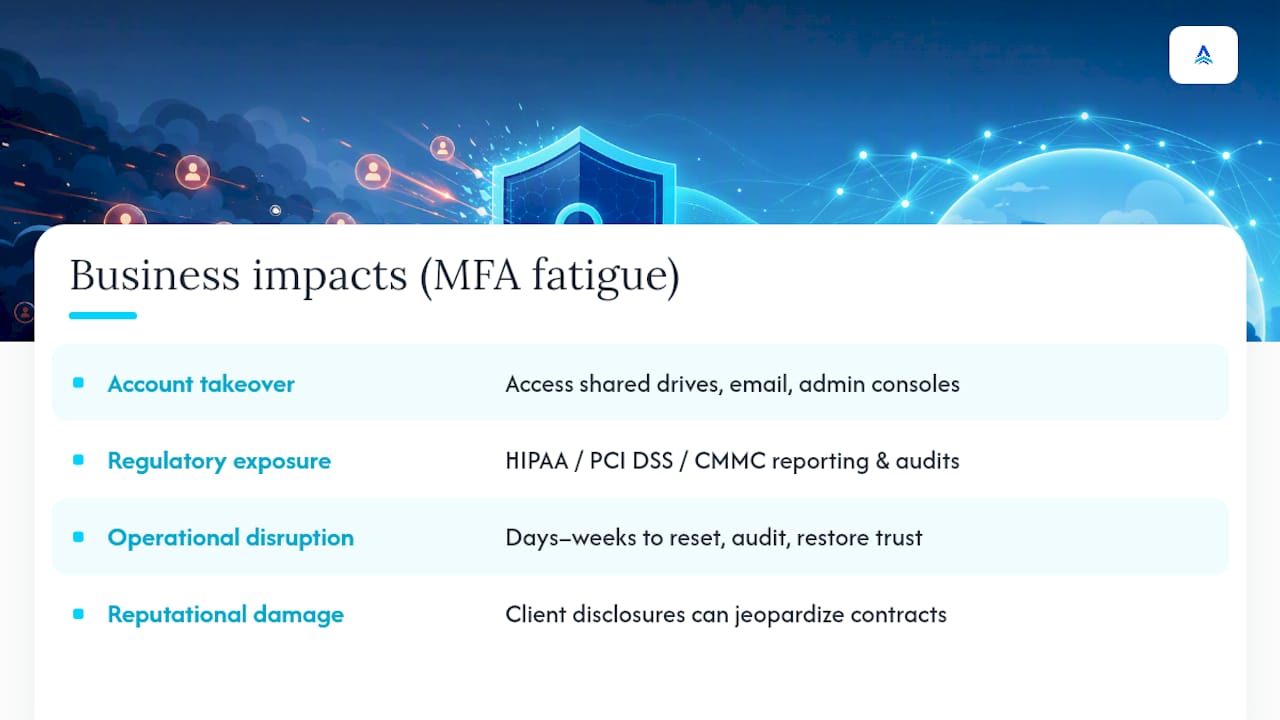
The immediate cost of one approved push notification is account takeover, but that’s rarely where the damage stops. Once inside, attackers commonly pivot toward whatever the compromised identity can reach: shared drives holding financial records, email threads useful for business email compromise against vendors or customers, or admin consoles that let them create new accounts for persistence.
For regulated organizations, the exposure compounds fast. A healthcare practice with a compromised account touching protected health information faces HIPAA breach notification obligations regardless of whether data was actually exfiltrated, just proving access occurred is often enough to trigger reporting duties. Financial firms and defense contractors face parallel exposure under PCI DSS and CMMC requirements, where a single unauthorized access event can trigger audit findings that take months to resolve.
There’s also a slower, less visible cost: operational disruption while a team resets credentials, audits OAuth grants, and rebuilds trust in the identity system organization-wide. That process pulls IT staff off other priorities for days, sometimes weeks, depending on how deep the attacker’s access went before detection. Reputational damage follows a similar arc for organizations that serve other businesses under contract, since a breach disclosure to a client or partner can jeopardize the relationship even when no data was ultimately stolen. The financial exposure from a single approved prompt rarely stays contained to a single account.
What’s Next for MFA Fatigue Attacks and Defenses
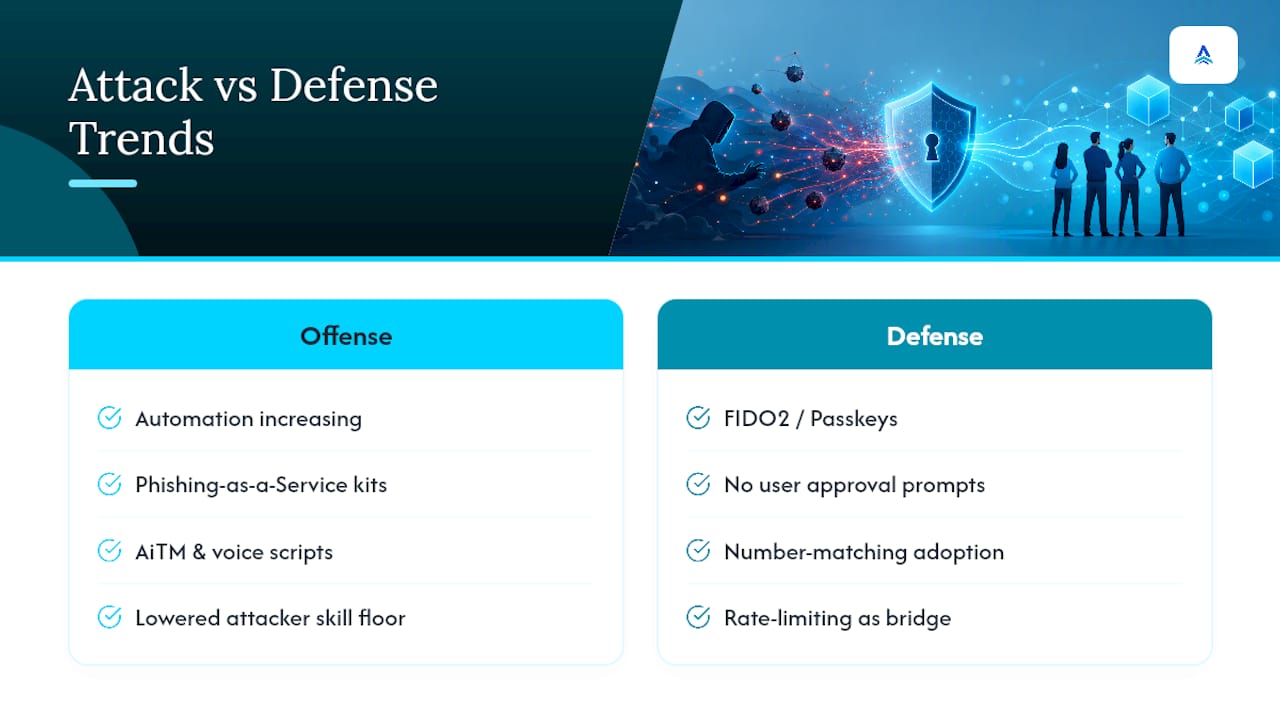
Push bombing is getting more automated, not less. Phishing-as-a-Service kits already package AiTM proxies, prompt-spam scripts, and voice-phishing scripts into a single subscription product, lowering the skill floor for running these campaigns. Expect that trend to keep accelerating as more of the toolkit gets commoditized.
The defensive side is shifting in a clearer direction: away from anything a user has to actively approve, toward credentials bound cryptographically to the legitimate site. FIDO2 and passkeys work specifically because there’s no prompt to fatigue someone into approving; the cryptographic handshake either matches the real domain or it doesn’t, which makes them structurally resistant to both push bombing and AiTM proxy attacks. Analyst consensus increasingly treats this migration as the durable fix rather than a nice-to-have, with number matching and rate-limiting serving as the bridge most organizations need while they get there.
Identity providers are also leaning harder into risk signals baked directly into the sign-in flow, factoring device posture, location, and behavioral baselines into the approval decision itself rather than leaving it entirely to the user. Expect number matching to become table stakes across major platforms within the next couple of years, with reducing MFA notifications to only genuinely risky sign-ins becoming the default posture rather than an advanced configuration. The organizations that get ahead of this now, rather than reacting to their own version of the Uber incident, will spend a lot less time in incident response.
The Roadmap Everyone Agrees On, and Why Most Still Skip It
The frustrating part of MFA fatigue is that the fix has been sitting in plain sight for a while. Number matching is not new technology. It is a checkbox in most identity platforms, and it closes most of the exposure this article describes. Yet plenty of organizations still run tap-to-approve push notifications with zero context, because nobody scheduled the hour it takes to change the setting.
Where conventional advice falls short is the assumption that user training closes this gap. It doesn’t, not reliably. Telling employees “don’t approve prompts you didn’t request” ignores that the attack is designed around exhaustion and pretext, not ignorance. The Uber and Cisco incidents both involved employees who almost certainly knew the general rule and still approved a prompt after enough pressure and a convincing enough phone call.
Prioritize the configuration change first, training second, and FIDO2 migration for your highest-risk accounts third. That order reflects what actually stops attacks versus what mostly makes everyone feel better after one already succeeded. Organizations that treat this as a technical fix with a training supplement, rather than the reverse, tend to close the gap faster and spend less time explaining a breach after the fact.
— Tyson
Sources
- Defend your users from MFA fatigue attacks — Microsoft Entra blog
- NIST SP 800-207: Zero Trust Architecture
- MITRE ATT&CK — Multi-Factor Authentication Interception (T1111)
- State of the art phishing: MFA bypass — Cisco Talos Blog
FAQ
How Can You Tell an MFA Fatigue Attack Is Happening?
Watch for a burst of MFA prompts to a single user in a short window, often several denials followed immediately by an approval, especially outside normal working hours or paired with a new device registration.
How Do You Prevent an MFA Fatigue Attack?
Enable number matching and contextual prompts, rate-limit how many push notifications can go out in a short period, and migrate high-risk accounts to phishing-resistant FIDO2 keys or passkeys.
What Are the Four Types of MFA?
The main categories are something you know (a password or PIN), something you have (a phone, hardware key, or authenticator app), something you are (biometrics like a fingerprint or face scan), and somewhere you are (location-based or contextual signals).
Is Two-Factor Authentication No Longer Secure?
Two-factor authentication is still far better than a password alone, but simple push-based 2FA is vulnerable to fatigue attacks and AiTM proxies. Number matching and phishing-resistant methods like FIDO2 close most of that gap.
Recommended
- In-House IT vs. Managed Security
- Managed IT Services in New Bedford, MA
- Cybersecurity Services for SMBs
- 5 Questions to Ask Before Hiring an MSP