Microsoft Secure Score is a measure that indicates how many of Microsoft’s recommended security controls your organization has enabled, across identity, devices, apps, and data. Sign into the Defender portal right now and you’ll see your current number and a ranked list of what to fix next. Treat it as a roadmap, though, not a guarantee. A high score means you’ve adopted good habits. It doesn’t mean you’re breach-proof.
TL;DR:
- Pursuing a higher Secure Score emphasizes adopting recommended controls, but it does not guarantee breach prevention or eliminate all security risks.
- Score improvements should focus on high-risk, low-effort actions such as enabling MFA on admin accounts and enrolling unmanaged endpoints to achieve quick, tangible gains.
- Access to manage Secure Score must be tightly controlled, favoring read-only or scoped remediation roles to prevent unintended configuration changes or risks.
- Regularly tracking score trends, communicating progress, and verifying changes after each sprint are essential to avoid regressions and accurately reflect security posture improvements.
- Combining Secure Score insights with broader security tools and frameworks ensures a more comprehensive approach, especially when managing multiple cloud environments like Microsoft 365 and Azure.
What Does Microsoft Secure Score Actually Measure?
Secure Score pulls signals from several products and rolls them into one number. It’s a Microsoft security assessment in the truest sense: it doesn’t test your network from the outside, it audits whether you’ve flipped the switches Microsoft already built for you.
The main coverage areas include:
- Microsoft Entra ID (identity, MFA enforcement, conditional access policies)
- Microsoft Defender for Endpoint (device hardening, patching status, attack surface reduction)
- Microsoft Defender for Cloud Apps (app governance, shadow IT visibility)
- Exchange Online (mail hygiene, anti-phishing controls)
- Microsoft Teams and SharePoint (sharing settings, data loss prevention)
A higher score means broader adoption of Microsoft’s recommended controls, indicating comparatively better configuration than organizations with lower scores. That’s genuinely useful information. Scores measure configuration hygiene, not human behavior, third-party risk, or the sophistication of whoever’s trying to get in.
How Is Your Secure Score Calculated?
Every recommended action carries a point value, usually 10 points or fewer, and Microsoft’s own scoring documentation makes clear that not every action is all-or-nothing.
By the Numbers: Enable multifactor authentication for 50 of your 100 users, and you don’t get zero credit and you don’t get full credit. You get partial points proportional to that 50% coverage. Push it to 100 users and the points scale up accordingly.
That partial scoring model matters for how you read month-to-month changes. A small score bump might reflect real progress on a rollout in flight, not a finished project.
Two other mechanics worth knowing:
- Classic vs. risk-based scoring. The Microsoft 365 Secure Score you see in Defender uses fixed point values, according to Microsoft’s documentation. Defender for Cloud’s Cloud secure score works differently, weighting recommendations by asset risk and criticality, so a vulnerability on a production database outranks the same issue on a test server.
- Preview recommendations. New checks often show up tagged as preview and don’t affect your score until they reach general availability. If your number moves without you touching anything, check the change log before you assume something broke.
How Do You Check Your Microsoft Secure Score?
Your score lives in one place, and it takes about ten seconds to find once you know the path.
- Sign into the Microsoft Defender portal at security.microsoft.com/securescore with an account that has the right permissions.
- Use the filter panel to sort recommendations by product, risk level, or due date, and pull up the score history chart to see your trend over the past 90 days.
- For each recommendation, mark it as planned, risk accepted, or resolved through third party if you’re mitigating the risk outside Microsoft’s suggested control.
That third option matters more than people realize. If you’re already covering a risk with a different tool, Secure Score lets you document that instead of leaving an open item that makes your dashboard look worse than your actual posture.
How Should You Prioritize Secure Score Recommendations?
The dashboard hands you a long list sorted by point value, and point value is the worst way to decide what to fix first. A 10-point recommendation that locks down every admin account matters more than three 3-point recommendations that tidy up rarely-used mailbox settings. Real prioritization runs on three axes: how much risk it actually removes, how much it disrupts users, and how much effort it takes your team to implement.
- Risk reduction: Does this recommendation close a path attackers commonly use, like unmanaged admin accounts or unpatched endpoints?
- User impact: Will this change break someone’s workflow, require retraining, or generate help desk tickets?
- Implementation effort: Can your team turn this on in an afternoon, or does it require a project plan?
For most small and mid-sized organizations, a handful of moves consistently rank as high-risk-reduction, low-effort quick wins: enforcing MFA on administrator accounts, enrolling stray laptops into Intune, and switching on Defender’s built-in protections that are sometimes left dormant after initial deployment. Unmanaged endpoints that never got enrolled in a management platform are one of the most common reasons device scores stall out, and enrolling them converts a lot of partial checks into full credit almost overnight.
Pro Tip: Run remediation in two-week sprints with a fixed list of three to five recommendations, and require a verification step at the end of each sprint. Teams that skip verification often “complete” a fix that reverts after the next tenant update.
Who Should Have Access to Manage Secure Score?
Secure Score touches identity and device configuration, which means access to it deserves the same scrutiny you’d apply to any admin console. Microsoft’s guidance recommends assigning purpose-built roles through Exposure Management or custom RBAC rather than handing out Global Administrator to everyone who needs to glance at a dashboard.
A workable governance setup usually includes:
- Read-only access for executives and compliance staff who need visibility into trends but shouldn’t be changing configurations.
- Remediation permissions scoped to the specific workload a team owns (an identity admin shouldn’t necessarily touch Exchange settings).
- A documented approval record any time a recommendation affects end users, noting who approved it, what it changed, and when it was verified.
Separating the people who implement fixes from the people who report on progress reduces the odds of someone quietly marking a risk as “accepted” to make a report look better.
How Do You Report Secure Score Progress to Leadership?
Your score history chart is the single most useful artifact for proving momentum to people who don’t live in the Defender portal every day. Export it monthly and pair it with a short list of what changed and why.
- Use the trend line, not the raw percentage, when talking to executives. A jump from 52% to 61% over a quarter tells a better story than either number alone.
- Resist the urge to benchmark against other companies’ scores. Microsoft’s own guidance treats Secure Score as an internal progress tool, not a public leaderboard, since scoring weights and product mix vary by tenant.
- Cyberinsurance conversations increasingly touch on posture metrics. Some US cyberinsurance carriers now factor posture indicators like Secure Score into underwriting, so a documented improvement trend can support better terms at renewal.
How ArchiTECH MSP Turns Secure Score Into a Remediation Plan
A number on a dashboard doesn’t fix itself, and that’s where most in-house IT teams get stuck. Some managed IT providers run Secure Score work through a six-step security framework including assess, prioritize, pilot, remediate, verify, and report.
In practice that looks like:
- Assess: Pull the current score, cross-reference it with a broader Microsoft Solution Assessment to catch gaps Secure Score doesn’t surface.
- Prioritize and pilot: Test high-impact changes like conditional access policies on a small user group before a full rollout.
- Remediate and verify: Roll changes out in sprints, then confirm they held after the next update cycle.
- Report: Deliver a trend summary leadership can actually use.
Pro Tip: If you have an internal IT team but limited security bandwidth, a co-managed model lets a managed IT provider handle the remediation heavy lifting while your team keeps day-to-day control. Full MSP management makes more sense when there’s no dedicated security staff at all.
How Does Secure Score Fit Into Your Broader Security Stack?
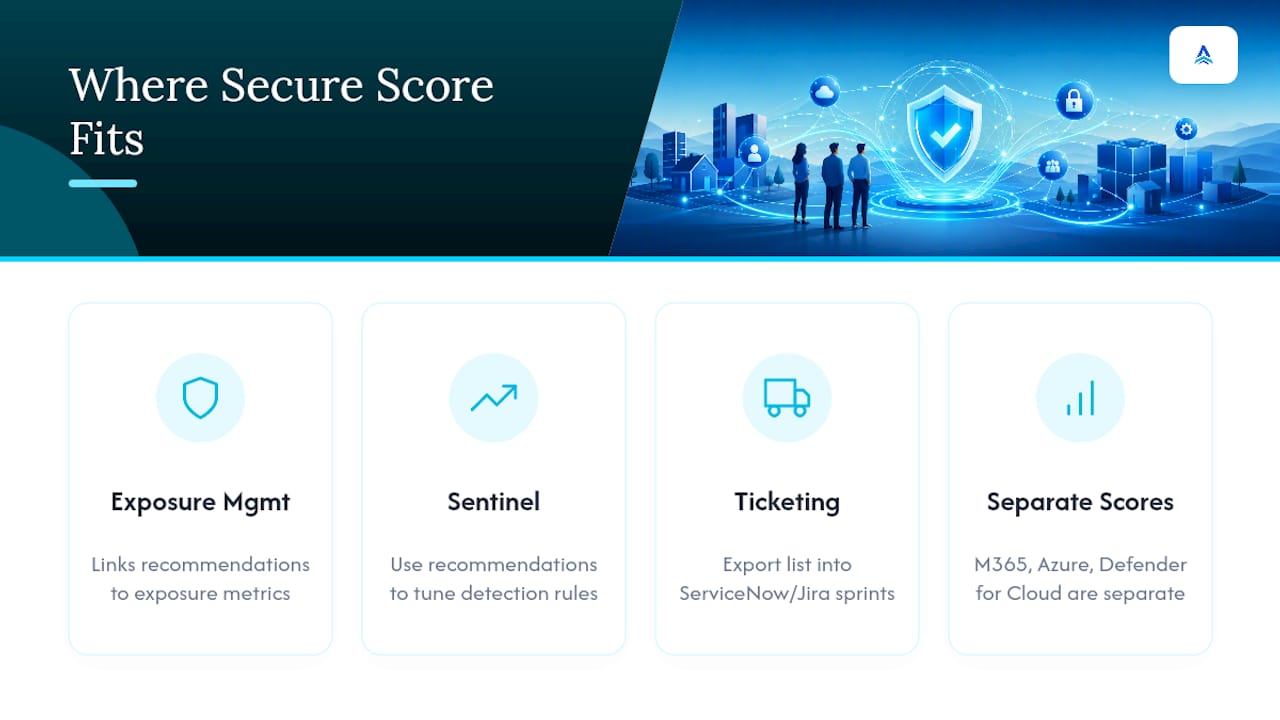
Secure Score works best as one input among several, not a standalone system of record. It integrates naturally with the Microsoft Defender portal’s broader Exposure Management view, which links recommendations to active security initiatives so a fix like enabling attack surface reduction rules shows up connected to the exposure metrics it actually influences, not floating as an isolated checklist item.
For organizations running Microsoft Sentinel, Secure Score recommendations can inform detection rule tuning. If a recommendation flags weak conditional access coverage, that’s also a hint about where your SIEM might be under-alerting. Teams using ticketing systems like ServiceNow or Jira often export the recommendation list and feed it directly into existing sprint boards, so remediation work sits alongside regular IT tickets instead of living in a separate silo that gets checked once a quarter.
The bigger structural point is that Secure Score, Azure Secure Score, and Microsoft Defender for Cloud’s Cloud secure score are related but separate systems. Microsoft 365 Secure Score covers your productivity and identity stack. Azure Secure Score, generated inside Microsoft Defender for Cloud, covers infrastructure and cloud resources and weights recommendations against the Microsoft Cloud Security Benchmark. Fixing something in one doesn’t move the needle in the other, which trips up a lot of teams who assume a single unified number exists somewhere. If your organization runs workloads in both Microsoft 365 and Azure, you’re managing two dashboards, not one, and your remediation calendar needs to account for both.
What Are the Biggest Challenges in Raising Your Score?
The most common failure mode isn’t lack of effort, it’s lack of sequencing. Teams tackle recommendations in the order Microsoft lists them, burn a month on low-impact fixes, and lose momentum before reaching the changes that actually reduce risk.
A second challenge is score volatility that has nothing to do with your work. Microsoft periodically retires old recommendations, introduces new ones, and moves preview items into general availability, which can shift your percentage even when nothing in your tenant changed. Checking the change log before panicking over a sudden dip saves a lot of wasted troubleshooting.
User pushback is the third recurring obstacle. Security recommendations that tighten sharing permissions or enforce stricter authentication often generate help desk complaints in the first week. Teams that skip a communication step before rolling out a change tend to face more resistance and, occasionally, requests to roll the change back entirely.
Best practices that consistently help:
- Communicate changes to affected users before flipping the switch, not after the complaints start.
- Batch related recommendations together (all identity fixes in one sprint, all device fixes in the next) rather than jumping between products.
- Revisit your score monthly rather than daily. Daily checking mostly measures noise, not progress.
- Keep a simple log of what you tried, what worked, and what got reverted and why. Institutional memory here saves real time during audits.
How Do You Actually Implement Score Improvements?
Start with an inventory, not a fix. Export the full recommendation list and tag each item by product area and estimated user impact before touching anything. This ten-minute step prevents the common mistake of starting with whatever recommendation happens to sit at the top of the dashboard.
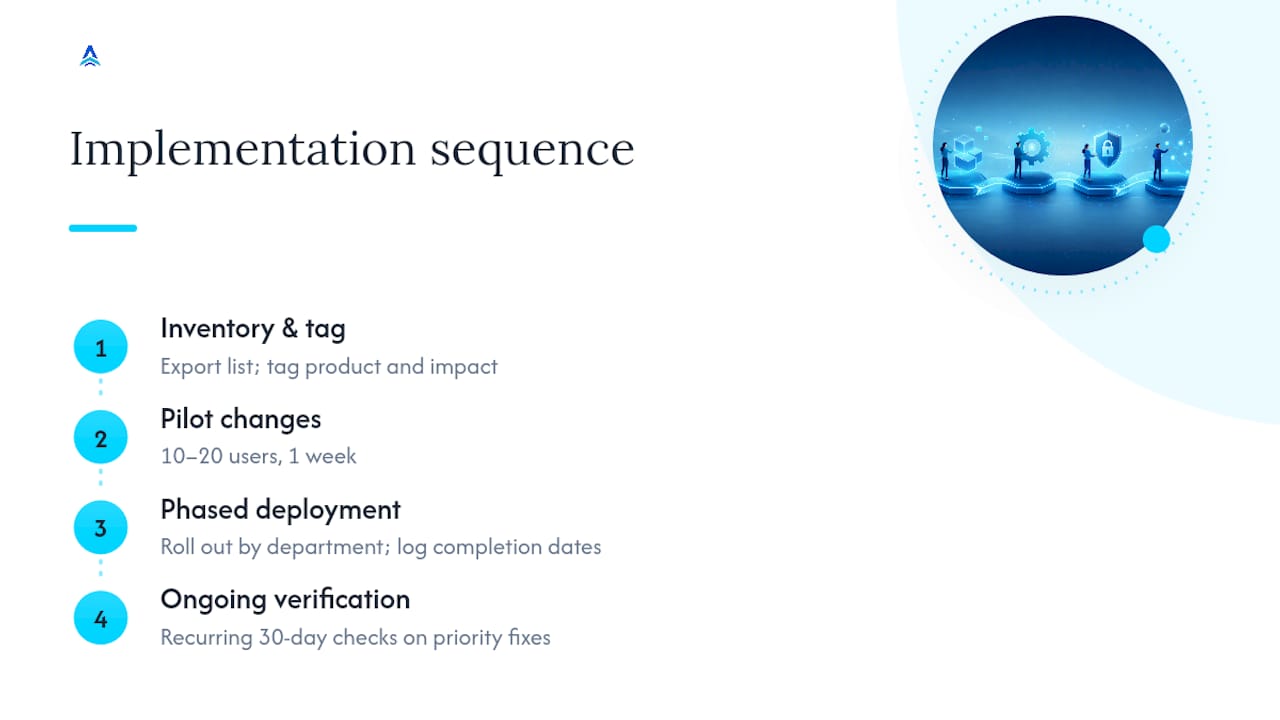
Next, pilot before you roll out broadly. Conditional access policies, attack surface reduction rules, and mailbox restrictions all behave differently across departments. Testing a change on a pilot group of 10 to 20 users for a week surfaces workflow conflicts before they hit your entire organization.
Once a pilot succeeds, deploy in stages rather than all at once. A phased rollout, department by department, gives your help desk time to absorb support tickets instead of getting flooded on day one. Document each stage’s completion date so your score history chart lines up with a clear internal timeline.
Finally, build verification into the process rather than treating it as optional. A recommendation that shows as “completed” in the dashboard can silently revert after a platform update or a misconfigured Group Policy override. Set a recurring 30-day check on your highest-priority fixes to confirm they’re still active, particularly for MFA enforcement and device compliance policies, which are the two areas most likely to drift.
A Roadmap, Not a Report Card
Chasing a perfect number misses the point. The real skill is reading each recommendation against actual business risk and user impact, then documenting the tradeoffs you accept along the way. That judgment matters more than the percentage ever will.
— Tyson
Get Help Turning Recommendations Into Results
Reading a Secure Score dashboard is one thing. Clearing forty backlogged recommendations without breaking anyone’s workflow is another problem entirely, and it’s the one most in-house IT teams don’t have the bandwidth for. ArchiTECH MSP handles that gap directly, with managed Microsoft 365 and Azure cloud security work, SOC-backed monitoring, and a remediation process built around the same six-step framework covered earlier.
If you run infrastructure in New England and want a second set of eyes on your current score, start with the free cybersecurity assessment. It’s a low-friction way to see exactly where your gaps sit before committing to anything further, and the same team can move straight into managed cybersecurity services if a full remediation program makes sense for your organization.
Where to Verify the Details
Check these directly when you’re implementing changes or confirming a claim in this article:
- Microsoft Secure Score documentation for scoring mechanics and product coverage
- Defender portal to view your live score and history
- Cloud secure score guidance for Azure-specific scoring
- Microsoft Solution Assessments for gaps beyond Secure Score’s scope
- Career resources for security professionals managing this work day to day
Sources
- Security
- Microsoft Secure Score — Microsoft Learn
- Cloud secure score (Defender for Cloud) — Microsoft Learn
- Microsoft Solution Assessments — Microsoft
FAQ
How Can I Check My Microsoft Secure Score?
Sign into the Microsoft Defender portal at security.microsoft.com/securescore. Your score, history, and full recommendation list appear on the main dashboard once you’re authenticated with an account that has the appropriate permissions.
What’s the Difference Between Microsoft Secure Score and Azure Secure Score?
Microsoft Secure Score covers Microsoft 365 workloads like identity, email, and endpoints, while Azure Secure Score, generated inside Microsoft Defender for Cloud, covers cloud infrastructure and uses risk-weighted scoring. They’re calculated separately and don’t affect each other.
Does Secure Score Affect Cyberinsurance Rates?
Some cyberinsurance carriers factor posture metrics like Secure Score into underwriting decisions, so a documented upward trend can support more favorable terms during renewal conversations.
Will Improving My Secure Score Disrupt Users?
Some recommendations, particularly around access restrictions and authentication, can affect user workflows if rolled out without warning. Piloting changes on a small group first and communicating ahead of a full rollout reduces help desk friction significantly.
What Kind of Company Handles Secure Score Remediation for Small Businesses?
Managed IT providers with dedicated security practices, like ArchiTECH MSP, typically handle this work by mapping Secure Score recommendations into structured remediation sprints rather than leaving IT teams to work through the backlog alone.
Recommended
- Cybersecurity Services for SMBs
- Microsoft 365 & Azure Cloud Security
- Free Cybersecurity Assessment
- In-House IT vs. Managed Security