An MDM policy is the governance document that defines who must enroll, what controls apply, and what happens when rules are broken, distinct from the MDM console that actually enforces those settings. It serves three audiences at once: employees who need clear rules, IT staff who need something enforceable, and auditors who need proof it’s real. Ten sections cover it: purpose, ownership models, acceptable use, enrollment, security standards, app management, privacy, lost/stolen procedures, offboarding, and review governance.
TL;DR:
- Effective MDM policies require precise language that directly maps clauses to enforcement settings within the management console.
- A named policy owner, clear approval date, and employee acknowledgment logs are critical audit components, especially for legal and compliance validation.
- Regular review cycles, at least annually, and immediate updates following major OS releases or security incidents are necessary for policy relevance.
- Separate privacy and enforcement rules for BYOD devices prevent legal issues and clarify IT’s visibility scope, including signed remote-wipe waivers.
- Small businesses should leverage templates and external cybersecurity services to develop audit-ready policies without extensive internal resources.
What Is a Mobile Device Management Policy (and What Belongs in It)?
A mobile device management policy is the written rulebook, not the software. Your MDM platform, whether that’s Microsoft Intune, Jamf, or another EMM tool, enforces settings. The policy explains why those settings exist, who they apply to, and what happens when someone breaks the rules. Confuse the two and you’ll end up with a console full of restrictions nobody agreed to and no paper trail when an auditor asks who approved them.
Ten sections show up in nearly every audit-ready policy, and each one earns its place for a specific reason:
- Purpose and scope: states which devices, roles, and data types the policy covers.
- Ownership models: BYOD (bring your own device), COBO (corporate-owned, business-only), and COPE (corporate-owned, personally enabled) each carry different rights and obligations.
- Acceptable use: what employees may and may not do on a managed device.
- Enrollment requirements: the deadline and method for getting a device under management.
- Security standards: passcodes, encryption, OS update cadence, remote wipe triggers.
- Application management: approved app lists, blacklisting, and the MAM (mobile application management) versus MDM split.
- Monitoring and privacy: what IT can see and what stays off limits.
- Lost/stolen procedures: reporting windows and wipe authorization.
- Offboarding: how access and data get pulled when someone leaves.
- Review and governance: who owns the document and how often it gets revisited.
Sections vary by ownership model. A COBO device policy can be aggressive about full-device wipe; a BYOD policy has to tread carefully around personal photos and texts. Auditors typically want three things above everything else: a named policy owner, a documented approval date, and acknowledgement logs proving employees actually read and signed the thing, not just that it exists somewhere on a shared drive.
Writing Policy Language That Maps to Real Technical Controls
The gap between a policy that sounds good and one that survives an audit comes down to specificity. Vague language like “devices must be secure” tells an auditor nothing. Language that names a control, and points to where that control lives in your EMM console, tells them everything.
Here’s how each section should read, paired with the setting that enforces it:
- Enrollment clause: “All devices accessing corporate email or data must enroll in [MDM platform] as soon as possible after provisioning.” This maps to enrollment enforcement rules and conditional access policies that block unenrolled devices from Microsoft 365 or Google Workspace, a workflow Microsoft documents in detail for Basic Mobility and Security.
- Passcode clause: “Devices must enforce a minimum 6-digit passcode with auto-lock after 5 minutes of inactivity.” This maps directly to a passcode profile pushed through the console.
- Encryption clause: “All managed devices must have full-disk encryption enabled.” Most modern phones handle this natively once enrolled, but the policy still needs to say it’s required, not assumed.
- App management clause: “Only applications on the approved list may access corporate data.” This maps to app blacklisting or an allowlist enforced through containerization.
- OS update clause: “Devices running an OS version more than two major releases behind current must be blocked from corporate access.” This maps to OS-version gating rules.
- Remote wipe clause: “IT may remotely wipe corporate data on a device reported lost, stolen, or terminated from employment.” This maps to the wipe function itself, logged for audit trail.
Reference compliance frameworks by name where they apply, citing NIST SP 800-124r2 for lifecycle and control guidance, or HIPAA where protected health information touches mobile devices. A sentence like “This control satisfies HIPAA Security Rule §164.312(a)(2)(iv) encryption requirements” gives an auditor exactly what they came for.
BYOD Privacy: What IT Can See, and What It Can’t
Personal devices raise a question employees ask before they’ll sign anything: what does IT actually see? Answer it plainly in the policy, not in a vague clause buried on page nine.
Spell out the boundaries directly:
- IT can see: device compliance status, corporate app inventory, and whether encryption and passcode rules are met.
- IT cannot see: personal photos, texts, browsing history, or the exact GPS location of a personal device outside a lost-device search.
- Corporate data lives in a managed container or profile; personal data and apps stay outside IT’s reach entirely.
A managed container approach, sometimes delivered through MAM rather than full MDM enrollment, avoids full-device wipe on a personal phone. That distinction matters enough to put in writing separately: a BYOD addendum with its own signed remote-wipe waiver, rather than folding personal-device rules into the main policy.
Pro Tip: Have employees sign the BYOD waiver as a standalone document, not a buried paragraph. If a wipe accidentally deletes someone’s personal photos, a separate signed acknowledgment is your best defense.
Enforcement Procedures: Lost Devices, Stolen Devices, and Exit Day
A policy that doesn’t say who acts, and by when, isn’t enforceable. It’s a suggestion.
- Reporting window: employees must report a lost or stolen device to IT promptly after discovery.
- Graded response: a lost device triggers a locate-and-lock attempt first; a stolen device or one missing beyond a reasonable time triggers immediate remote wipe of corporate data.
- Escalation path: unresolved reports escalate to the IT security lead in a timely manner, with HR involved for employment-related cases.
- Offboarding checklist: revoke email and app access same day, execute corporate wipe, collect corporate-owned hardware, and log completion with a timestamp.
- Exceptions and discipline: any deviation from these timelines requires documented approval from IT leadership; repeated policy violations follow the same disciplinary track as other IT policy breaches, reviewed jointly with HR.
Every one of these steps needs a named owner. “IT will handle it” isn’t a procedure; “the security lead initiates wipe within 1 hour of a confirmed theft report” is.
Rolling Out the Policy Without Breaking Everyone’s Phone on Day One
Don’t push a finished policy to the entire company at once. Pilot it first, the same approach NIST’s NCCoE recommends for mobile device security more broadly.
- Pilot with 10 to 15 percent of staff across different roles and device types, tracking enrollment failures, help desk tickets, and time-to-compliance.
- Set a full-rollout timeline once pilot issues are resolved, typically 2 to 4 weeks after a clean pilot.
- Communicate the “why” before the “what”: a short email explaining the policy’s purpose reduces resistance more than the policy document itself.
Configure these at rollout, not after:
- Minimum OS version and automatic update enforcement
- Full-disk encryption and passcode requirements
- EDR (endpoint detection and response) agent deployment
- App allowlist/blocklist rules
- Automated remediation: block corporate access, quarantine the device, or trigger remote wipe when a device falls out of compliance
Keeping the Policy Alive: Ownership, Review Cadence, and Audit Evidence
A policy nobody revisits is a policy that’s wrong within a year. Review it annually at minimum, with a named owner, typically the CISO or IT director, holding sign-off authority.
- Review cadence: annual review, with the owner’s name and approval date printed directly on the document.
- Required artifacts: version history, employee acknowledgement logs, enrollment compliance reports, and remote-wipe action logs retained in a secure archive.
- Out-of-cycle triggers: a major OS release, a new regulatory requirement, or a security incident should all force an immediate review, not wait for the annual cycle.
Institutional examples, like UConn’s endpoint device security policy, show exactly what auditors expect on the page: named owner, effective date, specific passcode minimums, and EDR/MDM enrollment stated as a requirement, not an assumption.
What SMBs Get Wrong When They Write This Policy Themselves
Most small businesses either skip the policy entirely and rely on the MDM console’s defaults, or write a policy so generic it could apply to any company on earth. Neither survives a HIPAA or PCI audit. The console enforces; the policy proves intent and accountability, and auditors ask for the second one.

The other mistake: writing the policy in an IT vacuum. HR and legal need a seat at the table before the first draft is final, especially on BYOD wipe waivers and disciplinary language. Skip that step and you’ll be rewriting the policy after your first employment dispute.
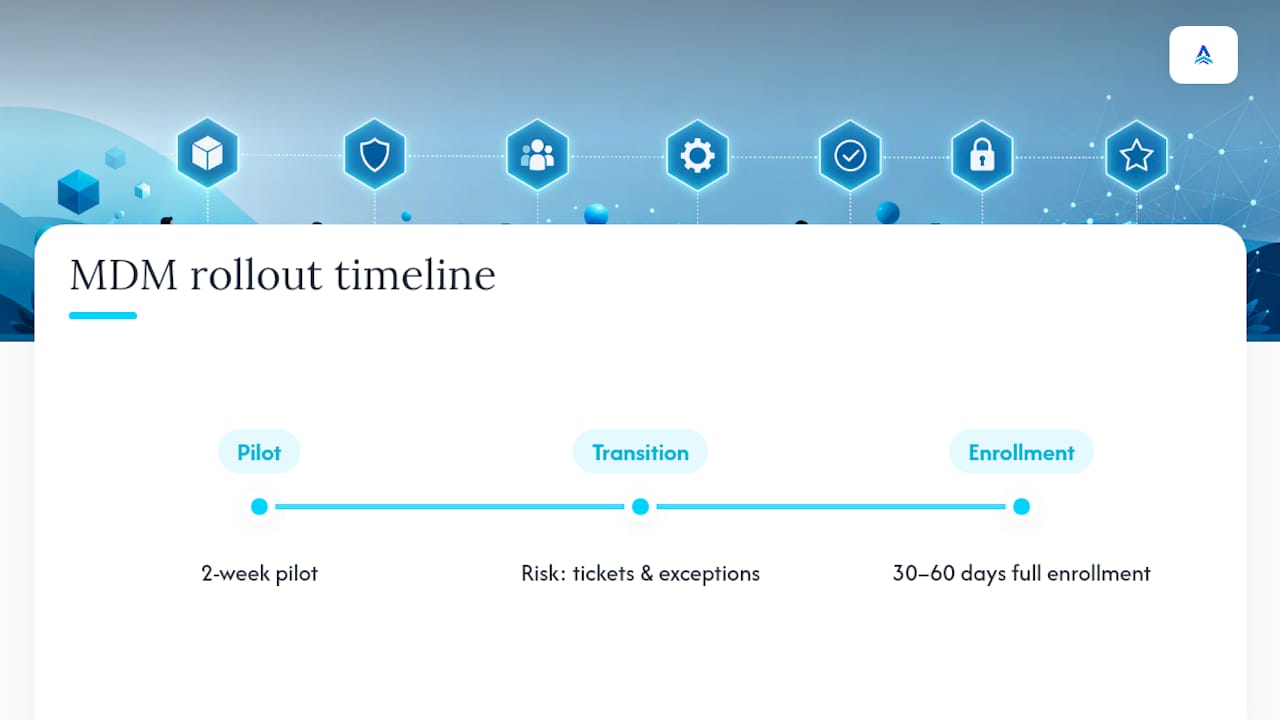
For a typical SMB, a realistic timeline runs a 2-week pilot followed by 30 to 60 days to full enrollment across the company. Budget for that. Rushing enrollment past a two-week pilot is how you end up with a help desk buried in tickets and a policy full of exceptions nobody documented.
Mobile Device Management Policy: A Practical Template for IT Teams
Here’s the judgment call the research actually supports: most MDM policy failures aren’t technical. They’re organizational. Companies buy an MDM platform, flip on the strictest default settings, and call that “the policy.” Then an auditor asks for the signed acknowledgement log and there isn’t one.
The conventional advice treats policy writing as a compliance checkbox, something you knock out once and file away. That’s backwards. The policy is the thing that makes your technical controls defensible. Without it, your encryption requirement is just a setting someone configured; with it, that setting becomes a documented decision with an owner, a date, and a business reason behind it.
If you do one thing first, separate governance from configuration. Write the policy as a human-readable document HR and legal can actually review, then map each clause to the console setting that enforces it. Skip the BYOD addendum at your own risk. It’s the section that protects you legally when a personal device gets wiped, and it’s the section SMBs cut first when they’re in a hurry.
— Tyson
Get Help Turning This Policy Into Something Auditors Actually Trust
Writing the policy is one thing. Mapping every clause to a real control, configuring the console to match, and keeping the evidence trail auditors want is a different job, and it’s the one most SMB IT teams don’t have spare hours for. ArchiTECH built its cybersecurity services around exactly that gap: policy drafting, control mapping, and compliance evidence collection handled as part of the same engagement, not three separate projects.
If your current mobile policy is a document nobody’s touched since it was written, or a console with settings nobody wrote down, a free cybersecurity assessment is the fastest way to find out where the gaps actually are. ArchiTECH reviews your current enrollment status, security controls, and documentation against frameworks like HIPAA and PCI, then hands you a specific list of what needs fixing before an auditor finds it first. For businesses that already have in-house IT but need the policy and compliance piece handled, ArchiTECH’s managed IT services work alongside your team rather than replacing it. Request the assessment and get a straight answer on where your policy stands.
Sources
For technical control mapping, NIST SP 800-124r2 is the authoritative reference on lifecycle management and EMM enforcement. For a starting template, SANS Institute’s MDM policy framework covers enrollment, encryption, and application control in language built for audit use. For an example of what a finished, audit-ready policy actually looks like on the page, UConn’s endpoint device security policy shows the specific fields auditors expect. Organizations building out HIPAA-specific app controls may also find Kreante’s HIPAA compliance checklist useful when mapping mobile app requirements to the Security Rule.
- Guidelines for Managing the Security of Mobile Devices in the Enterprise (NIST SP 800-124r2)
- Endpoint Device Security Policy, Information Technology | University of Connecticut
FAQ
What’s the difference between MDM and MAM?
MDM manages the entire device, including OS settings and full wipe capability, while MAM (mobile application management) controls only corporate apps and data within a container, leaving the rest of a personal device untouched.
Does a mobile device management policy apply to BYOD devices?
Yes, but BYOD devices typically get a separate addendum covering privacy disclosures, managed container enrollment, and a standalone signed remote-wipe waiver rather than the same full-device rules applied to corporate-owned hardware.
How often should an MDM policy be reviewed?
Review it annually at minimum, with additional out-of-cycle reviews triggered by major OS updates, new regulatory requirements, or a security incident involving a mobile device.
Who should own the mobile device management policy?
A named individual, typically the CISO or IT director, should hold sign-off authority, with HR and legal involved in drafting any BYOD or disciplinary language.
Can a small business build an audit-ready MDM policy without a big IT team?
Yes, using a template like SANS’s framework as a starting point and mapping each clause to actual console settings; ArchiTECH’s cybersecurity services also help SMBs draft and operationalize this without dedicating internal staff to the project.
Recommended
- How to Choose a Managed IT Provider in MA
- Managed IT Services in New Bedford, MA
- In-House IT vs. Managed Security
- 5 Questions to Ask Before Hiring an MSP