You can meet PCI DSS v4.0.1 with a scoped checklist and an evidence-first roadmap, and you do not need a security department to pull it off. The path starts with three things: confirm your merchant level, map every place cardholder data touches your systems, and figure out which Self-Assessment Questionnaire (SAQ) actually applies to you.
Do these three things this week:
- Check your merchant level. Your acquirer or payment processor sets this based on annual transaction volume, and it determines whether you self-assess or need a formal Report on Compliance (ROC).
- Start a data-flow map of your Cardholder Data Environment (CDE). Every system, vendor, and network segment that stores, processes, or transmits card data belongs on this map, even the ones you assume are out of scope.
- Schedule a quarterly external scan with an Approved Scanning Vendor (ASV) if any public-facing IP address touches your payment environment.
The rest of this checklist walks through the 12 PCI DSS requirements, a realistic project timeline, and the mistakes that trip up most small businesses during their first assessment. The PCI Security Standards Council publishes the official requirements, testing procedures, and SAQ forms referenced throughout, and a managed provider like ArchiTECH MSP can help translate the standard into evidence you can actually hand an assessor.
Key Takeaways
Meeting PCI DSS v4.0.1 comes down to accurate CDE scoping, mandatory MFA and automated logging, and evidence collected continuously rather than assembled the week before an assessment.
| Point | Details |
|---|---|
| Scope first | Map your CDE and confirm merchant level before touching any technical control. |
| MFA is non-negotiable | v4.0.1 requires multi-factor authentication for all access into the CDE, not just remote admins. |
| Automate log review | Manual weekly log checks no longer satisfy Requirement 10; daily automated review is expected. |
| Match your SAQ to your integration | Hosted redirects often qualify for SAQ A, but iframes usually push you to SAQ A-EP. |
| Consider MSP support | ArchiTECH MSP maps its six-step framework directly to CDE scoping, MFA rollout, and log automation for SMBs without in-house security teams. |
PCI Compliance Checklist: The 12 Requirements Under v4.0.1
PCI DSS organizes its controls into 12 requirements, and v4.0.1 tightened several of them with future-dated provisions that became mandatory on March 31, 2025. If you are still working from a checklist built around v3.2.1, you are missing controls your assessor will now expect. Here is what each requirement demands and the evidence you need to prove you meet it.
PCI DSS v4.0.1’s new mandatory controls, effective since March 31, 2025, changed what “compliant” means for SMBs — automated log review, MFA for all CDE access, and payment page script monitoring are no longer optional extras. They are baseline requirements, and the updated Requirements and Testing Procedures spell out exactly how assessors test for them.
-
Install and maintain network security controls. Goal: firewalls and routing rules that isolate the CDE from the rest of your network. Evidence: current firewall rule sets, a network diagram showing CDE boundaries, and a documented review of those rules (required at least every six months).
-
Apply secure configurations to all system components. Goal: no vendor default passwords, no unnecessary services running. Evidence: hardening standards documentation, configuration baselines, and scan results showing no default credentials in use.
-
Protect stored account data. Goal: cardholder data is either not stored at all or is encrypted, truncated, or tokenized. Evidence: a data retention policy, encryption key management procedures, and proof that primary account numbers are masked when displayed.
-
Protect cardholder data with strong cryptography during transmission. Goal: TLS 1.2 or higher on every transmission path that carries card data over open networks. Evidence: TLS configuration scans and a current inventory of encryption protocols in use.
-
Protect all systems from malware. Goal: anti-malware tooling deployed and updated on all applicable systems, with scans logged. Evidence: deployment reports, update logs, and alert-response records.
-
Develop and maintain secure systems and software. Goal: patched systems and secure coding practices, including a payment page script inventory under v4.0.1’s new requirement 6.4.3. Evidence: patch management logs, change-control records, and a documented list of every script that loads on payment pages.
-
Restrict access to system components by business need to know. Goal: role-based access, least privilege enforced. Evidence: access control matrices and periodic access reviews.
-
Identify users and authenticate access. Goal: unique IDs for every user and, critically, multi-factor authentication for all access into the CDE, not just remote or administrative access — learn more about effective Security and Trust solutions that support this requirement. Evidence: MFA configuration screenshots, a test log showing a successful MFA challenge, and a password policy document. MFA enabled for all CDE accounts — Yes/No? If no, this is your top remediation priority.
-
Restrict physical access to cardholder data. Goal: locked server rooms, visitor logs, media destruction procedures. Evidence: visitor logs, badge access records, and destruction certificates for retired hardware.
-
Log and monitor all access to system components and cardholder data. Goal: centralized logging with automated daily review, a v4.0.1 requirement that replaces manual log-checking for most environments. Evidence: SIEM configuration, automated alert rules, and sample review reports.
-
Test security of systems and networks regularly. Goal: quarterly ASV scans, authenticated internal vulnerability scans, and annual penetration testing that covers the CDE and any segmentation controls. Evidence: ASV scan reports showing passing status, internal scan reports, and a penetration test report with remediation tracking.
-
Support information security with organizational policies and programs. Goal: a documented security policy, incident response plan, and a Targeted Risk Analysis (TRA) for any control where you use the customized approach. Evidence: signed policy documents, incident response test records, and TRA worksheets tied to specific requirements.
Pro Tip: Build a single evidence folder structured by requirement number, not by department. When an assessor asks for proof under Requirement 8, you want to hand over one folder, not chase down five people for screenshots.
How Do You Build a PCI Compliance Roadmap?
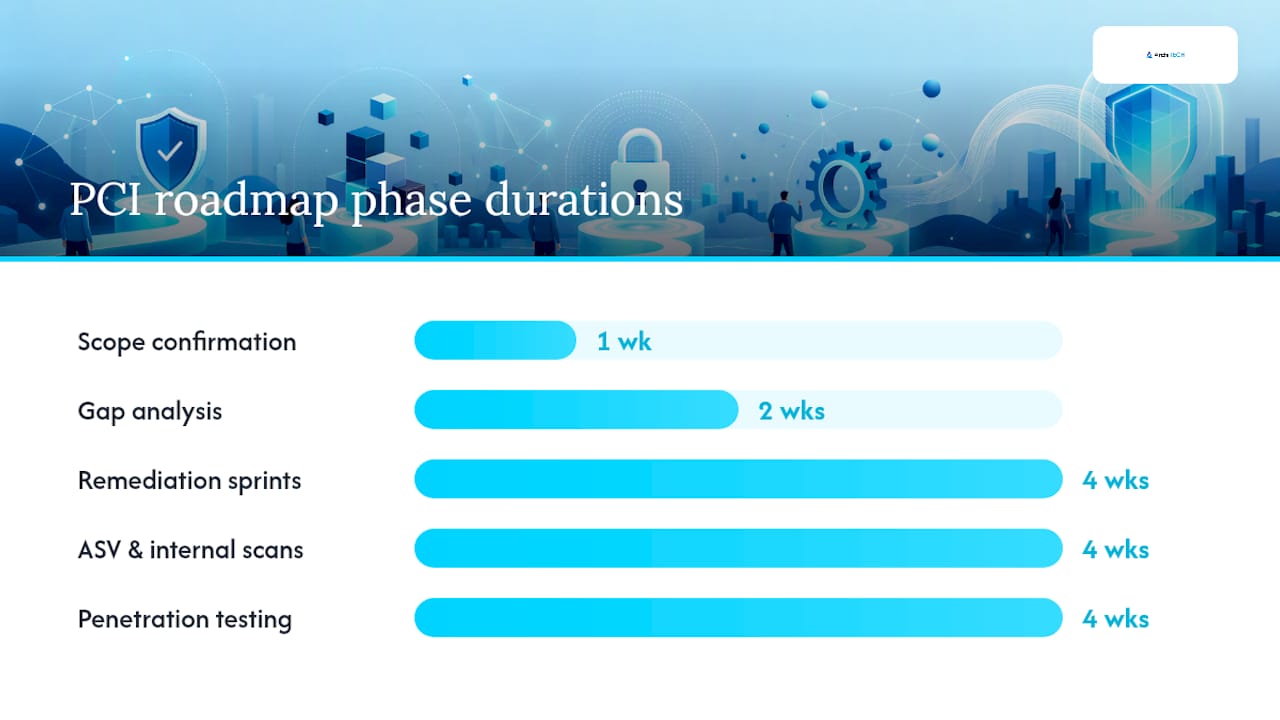
A realistic SMB timeline runs 2 to 12 weeks depending on how mature your environment already is, according to typical merchant compliance guides. Here is how to sequence it.
-
Week 1: Scope confirmation. Build your CDE data-flow map and confirm your merchant level with your acquirer. Owner: internal compliance lead or IT manager. Deliverable: a signed-off network diagram showing every system that touches card data.
-
Weeks 1 to 2: Gap analysis. Compare current controls against all 12 requirements using the checklist above. Owner: internal team, or an MSP if you lack in-house security staff. Deliverable: a findings list ranked by severity.
-
Weeks 2 to 6: Remediation sprints. Fix MFA gaps, tighten firewall rules, deploy log automation, and document your TRA where you use compensating or customized controls. Owner: IT team plus any outsourced security partner. Deliverable: closed findings with evidence attached to each one.
-
Weeks 4 to 8: ASV and internal scans. Run quarterly external scans through an approved vendor and authenticated internal scans. Owner: ASV plus internal IT. Deliverable: clean scan reports, or a remediation plan for any failures.
-
Weeks 6 to 10: Penetration testing. Required annually and after significant infrastructure changes. Owner: a qualified third party. Deliverable: a pen test report with tracked remediation.
-
Weeks 8 to 12: SAQ or ROC completion and Attestation of Compliance (AoC). Owner: compliance lead, reviewed by a Qualified Security Assessor (QSA) if you fall under a ROC requirement. Deliverable: signed AoC submitted to your acquirer.
Pro Tip: Do not wait until week 10 to start your penetration test scheduling. Qualified testers book out weeks in advance, and a delayed pen test is the single most common reason SMBs miss their own compliance deadline.
Ongoing monitoring follows on a fixed cadence after that: quarterly ASV scans, annual revalidation, and continuous evidence collection so next year’s assessment is not a scramble.
Which PCI SAQ Type Do You Need?
Your merchant level and your payment integration together determine your validation path, and getting this wrong is one of the most common compliance headaches for small businesses.
Merchant levels in the U.S. generally break down by annual Visa or Mastercard transaction volume: Level 1 (over 6 million transactions) typically requires an annual ROC completed by a QSA; Levels 2 through 4 usually qualify for a Self-Assessment Questionnaire, though your acquirer has final say.
- SAQ A applies to merchants who fully outsource card data handling to a compliant third party through a hosted payment page or redirect, with no card data touching their own servers.
- SAQ A-EP applies when your website controls the payment page even if the actual transaction happens elsewhere, such as with certain iframe implementations.
- SAQ D is the broadest and most demanding questionnaire, required when you store, process, or transmit cardholder data directly.
The iframe-versus-redirect distinction causes more misclassification than anything else on this list. Merchants often assume an iframe qualifies them for SAQ A because the payment fields look outsourced, when in reality the surrounding page script still puts them in SAQ A-EP territory. Stripe’s merchant guidance breaks this down by integration type, and it is worth reading before you self-select a questionnaire.
Hosted checkout pages, tokenization, and point-to-point encrypted terminals all shrink your scope dramatically, but you still own responsibility for the systems around the payment flow, including your network segmentation and your employees’ access.
Reducing Your Scope: Segmentation That Assessors Accept
The fastest way to make PCI DSS manageable is to shrink the environment it applies to. A QSA’s most common frustration is a merchant who assumed a system did not touch cardholder data when it actually did, according to Microsoft’s PCI DSS scoping guidance. Accurate scoping is the highest-leverage step you can take before an assessment even starts.
- Map every connected system. List POS terminals, payment gateways, backup systems, and any third-party service that could touch card data, even indirectly.
- Segment with VLANs and firewall rules. Isolate the CDE on its own network segment with documented, tested firewall rules, and keep evidence of the last rule review.
- Deploy a web application firewall in front of any customer-facing payment page to catch injected scripts or malicious code changes.
- Use tokenization so a token, not the actual card number, moves through your internal systems after the initial transaction.
- Take the hosted redirect or DTMF masking shortcut for call-center or e-commerce flows. Redirecting checkout to a compliant processor, or masking card numbers entered by phone through dual-tone signaling, removes entire systems from scope.
Document all of it. An assessor wants a network diagram, a list of in-scope systems, and proof your segmentation controls were actually tested, not just configured once and forgotten.
What Causes Most PCI Audit Failures?
Assessors and compliance guides consistently point to the same handful of failure points, and industry checklists confirm these show up far more often than exotic technical gaps.
- Wrong SAQ selection, usually from the iframe-versus-redirect confusion covered above.
- Missing MFA on CDE access, especially for internal admin accounts that “everyone already trusts.”
- Unmanaged payment page scripts, where a third-party analytics or marketing tag gets added without anyone reviewing whether it touches the payment flow.
- Manual, inconsistent log review instead of the automated daily review v4.0.1 now expects.
- Default vendor settings left untouched on POS systems or network devices.
Fix them in this order: descope what you can, close MFA gaps, audit and lock down payment page scripts, automate your log review, then run authenticated internal scans to confirm the fixes held. Document everything as you go.
Pro Tip: If you cannot fix a finding immediately, document a compensating control and a remediation timeline. Assessors generally accept a documented exception with a real deadline; they do not accept silence.
How ArchiTECH MSP Operationalizes PCI Compliance
ArchiTECH MSP is a security-first managed IT provider built around a six-step framework designed to get small and mid-sized businesses to compliance without hiring an internal security team, and its approach to HIPAA and PCI compliance reflects that same structure.
Services that map directly to this checklist include:
- CDE mapping and scope confirmation, the same data-flow exercise covered above
- MFA rollout across CDE access points, closing the single most common audit gap
- SIEM deployment and automated log review, satisfying the v4.0.1 monitoring requirement
- ASV scan coordination and support preparing for QSA review
- Ongoing network monitoring so authenticated internal scans stay current
If you want an outside read on where your environment stands before you commit to a full remediation project, ArchiTECH MSP offers a free cybersecurity assessment that identifies gaps against these exact requirements.
| Checklist area | ArchiTECH MSP support |
|---|---|
| CDE scoping | Data-flow mapping and network segmentation review |
| Access control | MFA deployment across all CDE-connected accounts |
| Monitoring | SIEM setup with automated daily log review |
| Scanning | ASV coordination and QSA preparation support |
Why Log Retention Rules Trip Up Small Businesses
PCI DSS Requirement 10 sets specific retention windows, and missing them is an easy way to fail an otherwise solid assessment. You need to retain audit log history for a full year, with recent logs readily accessible to support timely analysis.
Most SMBs get the 12-month part right by accident, because their backup systems happen to retain that much data anyway. Where they fail is the 90-day “immediately available” clause. If your logs from six weeks ago require restoring a backup tape or waiting on a support ticket with a cloud vendor, that does not satisfy the requirement. Assessors expect to query recent logs on demand during the assessment itself.

Beyond retention, v4.0.1 requires automated daily review of security logs rather than a periodic manual glance. A centralized log management or SIEM tool that flags anomalies automatically satisfies this far more reliably than a person scrolling through log files once a week, which is also how most log review gaps get discovered only after an incident.
Set this up early in your remediation timeline. Retention and automated review both take weeks to accumulate a meaningful evidence trail, and an assessor cannot verify 90 days of “immediately available” logs if you only turned the system on last week.
What Does PCI-Compliant Incident Response Look Like?
Requirement 12 expects a documented, tested incident response plan, and this is one area where a written policy sitting in a drawer will not survive contact with a real breach.
Your plan needs defined roles: who declares an incident, who isolates affected systems, who contacts your acquirer, and who handles customer communication. It needs technical steps for containment, specifically how you disconnect a compromised system from the CDE without destroying forensic evidence. And it needs a notification sequence, because payment card breaches typically require notifying your acquiring bank and the card brands within a specific window defined by your merchant agreement, not just state breach notification law.

Test the plan at least annually with a tabletop exercise. Walk through a realistic scenario, such as a compromised POS terminal or a skimming script injected into your checkout page, and confirm every named role actually knows their job. Untested plans routinely fail during real incidents because the person listed as “primary contact” changed roles eight months ago and nobody updated the document.
Keep evidence of the test itself: a summary of the scenario, who participated, and what gaps you identified. Assessors look for proof the plan was exercised, not just written.
Do Employees Need PCI Compliance Training?
Yes, and this is one of the more overlooked requirements. Requirement 12 mandates a security awareness program for anyone who handles cardholder data or has access to systems in the CDE, delivered at least annually with documented completion.
Training should cover recognizing phishing attempts (still the most common entry point into a CDE), proper handling of physical media containing card data, and what to do if an employee suspects a breach. New hires need this training before they get CDE access, not sometime in their first quarter.
Document attendance and content for every session. An assessor will ask for training records tied to specific dates and a roster, not a general statement that “we train our staff.”
Authoritative PCI Resources and Forms
- PCI Security Standards Council — Standards Library: official requirements, SAQ forms, and QSA/ASV registries
- Stripe’s PCI DSS checklist: practical SAQ selection guidance by integration type
What This Checklist Gets Right That Most Advice Doesn’t
Most PCI content still treats this like a v3.2.1 world, listing generic controls without flagging which ones became mandatory on March 31, 2025. That is a disservice to any SMB budgeting time and money against an outdated checklist. The controls that actually catch businesses off guard now are automated log review, MFA across the entire CDE, and payment page script inventories, not the firewall and encryption basics everyone already expects.
The conventional advice to “just fill out the SAQ” also undersells how much scoping mistakes drive audit pain. I’d argue accurate CDE mapping is worth more than any single technical control on this list, because a bloated scope multiplies the work required everywhere else. Shrink the CDE first, and the remaining requirements get dramatically easier to satisfy.
Where I’d push back hardest: businesses treat the Targeted Risk Analysis as paperwork theater. It is not. Under v4.0.1, a TRA is your documented justification any time you use a customized approach or a compensating control, and a thin or copy-pasted TRA is exactly the kind of thing that turns a routine assessment into a drawn-out one.
Prioritize scope reduction, then MFA, then automation. Everything else is easier once those three are solid.
— Tyson
Get PCI Compliant Without Building a Security Team
You now have the full checklist, but implementing MFA across every CDE account, standing up a SIEM with automated daily review, and coordinating ASV scans takes real time most SMB owners don’t have sitting around. ArchiTECH MSP is built for exactly this gap: a security-first managed IT provider whose six-step framework already maps to PCI’s requirements, so you’re not translating a compliance standard into technical work on your own.
Where a general-purpose IT vendor treats compliance as an add-on project, ArchiTECH MSP’s cybersecurity services are structured around HIPAA and PCI from the start. That means the MFA rollout, log automation, and CDE scoping work covered in this checklist gets handled by a team that already knows where the common failure points hide.
Start with the free cybersecurity assessment to see exactly where your environment stands against these 12 requirements before you commit to a remediation timeline.
Sources
- PCI Security Standards (PCI SSC) — Standards
- PCI-DSS v4.0.1 (Requirements and Testing Procedures excerpt)
- PCI DSS checklist for businesses — Stripe
- PCI DSS Compliance Checklist — RealCISO
FAQ
What Is a PCI Compliance Checklist?
A PCI compliance checklist is a structured list of the controls and evidence required under PCI DSS’s 12 requirements, covering areas like network security, access control, encryption, and logging, used to prepare for an SAQ or ROC.
What Are the 12 Requirements for PCI Compliance?
The 12 requirements cover network security controls, secure configurations, protecting stored data, encrypting data in transit, malware protection, secure systems and software, access restriction, authentication (including MFA), physical access controls, logging and monitoring, regular security testing, and an information security policy.
Can I Do PCI Compliance Myself?
Yes, if you qualify for a Self-Assessment Questionnaire rather than a Report on Compliance, though many SMBs bring in a managed provider like ArchiTECH MSP to handle CDE mapping, MFA deployment, and log automation rather than building that expertise internally.
What Is a Targeted Risk Analysis Under PCI DSS v4.0.1?
A Targeted Risk Analysis is documentation required whenever you use a customized approach or compensating control instead of a standard PCI DSS requirement, justifying why your alternative control meets the same security objective.
How Often Do I Need an ASV Scan?
Quarterly, for any environment with internet-facing IP addresses in scope, alongside authenticated internal vulnerability scans and an annual penetration test under PCI DSS v4.0.1’s testing procedures.
Recommended
- How to Choose a Managed IT Provider in MA | ArchiTECH MSP
- HIPAA IT Requirements: A Guide for MA Healthcare Practices | ArchiTECH MSP
- Cybersecurity Services for SMBs | ArchiTECH MSP | MA