System hardening means locking down every default configuration, unused service, and open port that gives an attacker a foothold, then enforcing least privilege everywhere else. Start with two moves before anything else: build a real asset inventory, and lock privileged accounts behind multi-factor authentication. Everything else in this checklist builds on that foundation as a repeatable baseline, not a one-time fire drill.
TL;DR:
- Building a comprehensive asset inventory and implementing multi-factor authentication for privileged accounts are critical initial steps before expanding system hardening efforts.
- The checklist covers all assets touching the network, including endpoints, servers, cloud instances, and containers, emphasizing reducing exposed attack surfaces.
- Applying the most restrictive standards, like DISA STIGs or CIS Benchmarks, depends on the environment’s risk level, with regular updates and validation essential to maintain security.
- Prioritizing high-risk controls such as privileged account MFA, patch cadence, and network segmentation yields the greatest security gains for small teams.
- Backup and recovery procedures must be equally hardened, with locked-down, encrypted offline copies and regular testing to ensure resilience against breaches.
What Does a System Hardening Checklist Actually Cover?
A hardening checklist spans every asset that touches your network: endpoints, servers, network devices, cloud instances, and containers. That’s broader than most administrators assume when they first hear the term.
Hardening is not the same job as patching or configuration management, even though the three overlap constantly. Patching closes known vulnerabilities in existing software. Configuration management tracks and enforces settings across your fleet. Hardening is the specific discipline of reducing what’s exposed in the first place: fewer accounts, fewer services, fewer open doors. System hardening reduces attack surface by removing default accounts, disabling services nobody uses, closing unnecessary ports, and enforcing least privilege, with a patch cadence layered on top.
Three reference frameworks come up constantly in this work, and you’ll see all of them again below:
- CIS Benchmarks, prescriptive configuration guides for dozens of operating systems and applications.
- NIST Special Publications, particularly the 800 series, covering risk management and control frameworks.
- DISA STIGs, the Department of Defense’s Security Technical Implementation Guides, often the most restrictive of the three.
Most SMB environments won’t need STIG-level lockdown. But knowing it exists helps you judge how far to push CIS recommendations when a client or auditor asks for “more.”
Why Does Skipping Hardening Actually Cost You?
Default configurations are the exploit path of least resistance. Unused services listening on open ports, factory admin accounts nobody renamed, RDP exposed to the internet because it was easier that way during setup. None of that requires a sophisticated attacker. It requires a scanner and patience.
Hardening pays off twice. First, it shrinks the number of ways in. Second, it directly supports compliance frameworks your business may already be on the hook for: PCI DSS for card data, HIPAA for protected health information, SOC 2 for service providers, and NIST 800-53 for anyone touching federal contracts.
There’s also a quieter operational benefit. A hardened, well-documented baseline makes incident investigation faster, because you know what “normal” looks like on every machine.
Pro Tip: Most breach investigations lose their first few hours just establishing what a system’s baseline configuration was supposed to be. A documented hardening standard turns that into a five-minute comparison instead of a guessing game.
The Complete System Hardening Checklist
This is the working list. Treat it as your standard operating environment (SOE) draft, not a one-and-done audit. Each category below maps to a real operational task you can assign, schedule, and verify.
1. User account and access controls
- Enforce least privilege on every account, service account included.
- Require MFA on all privileged and remote access accounts, no exceptions for “just this one vendor login.”
- Disable or rename default administrator and guest accounts on every device.
- Audit privileged account membership quarterly and remove anyone who’s changed roles.
2. Network configuration and segmentation
- Set network access control lists to default-deny, then open only what’s needed.
- Put management interfaces on a dedicated VLAN, isolated from user traffic.
- Restrict RDP and SSH access to specific management IP ranges, never to “any.”
- Document every segmentation rule so the next admin understands why it exists.
3. Firewall configuration (host and perimeter)
Firewalls need attention at both layers. Perimeter firewalls should run default-deny with explicit allow rules, logging enabled on denies, and a scheduled rule review, ideally quarterly, to strip out entries nobody remembers adding. Host-based firewalls on individual endpoints and servers deserve the same discipline: block inbound by default, allow only what the running services require, and treat every open port as a decision that needs a reason attached to it.
4. Patch management and update cadence
Set explicit windows by severity rather than patching whenever it’s convenient. A workable cadence: critical patches within 24 to 72 hours, high-severity within 7 to 14 days, and everything else within 30 days, adjusted to your actual risk tolerance. Track end-of-life software separately. An unsupported OS or application is a hardening gap that patching alone can’t fix. Third-party applications, browsers, PDF readers, and the like need the same cadence as the OS, not an afterthought.
5. Windows-specific hardening
- Disable SMBv1 entirely; it has no legitimate reason to still be running.
- Enable BitLocker on every drive that can hold sensitive data.
- Turn on Credential Guard to protect stored credentials from memory-scraping attacks.
- Restrict RDP to management IPs and require Network Level Authentication.
6. Linux-specific hardening
- Disable root SSH login and require key-based authentication for everyone.
- Enable SELinux or AppArmor rather than leaving mandatory access control off.
- Configure auditd to log privilege escalation and file integrity events.
- Remove compilers and package managers from production systems where they aren’t needed.
7. Service and application hardening
Strip out every service that isn’t actively required, not just the obviously dangerous ones. Run remaining services under low-privilege accounts instead of system or root. Application whitelisting, also called application control, stops unauthorized executables from running at all. Host-based controls like application control and host intrusion prevention measurably increase detection and cut down what malicious code can actually execute.
8. Logging, monitoring, and centralized logs
Logs are only useful when they’re centralized, protected from tampering, retained per policy, and actually reviewed. A syslog server nobody checks is a compliance checkbox, not a security control. Set alerts for the events that matter: failed privileged logins, new local admin accounts, firewall rule changes. A partner focused on continuous monitoring, like Summit Security, can catch drift between your scheduled reviews.
9. Physical security and device controls
- Set BIOS/UEFI passwords to block unauthorized boot changes.
- Enable full-disk encryption on every laptop and mobile workstation.
- Restrict physical server room or closet access to a documented list of people.
10. Cloud and virtualization notes
Build hardened golden images and bake configuration into provisioning rather than fixing instances after they’re live. Lock down security groups to specific sources, not open ranges. Cloud hardening also means enforcing least-privilege IAM and monitoring for configuration drift, since cloud environments change faster than most on-prem infrastructure ever did.
What Are the Main Types of System Hardening?
Every checklist item above falls into one of four categories, and knowing which one you’re working in tells you which benchmark to reach for.
- OS hardening: account controls, service reduction, patching. Start with the CIS Benchmark for your specific OS version.
- Application hardening: database, web server, and business application settings. Vendor hardening guides usually come first here, with CIS filling gaps.
- Network hardening: firewall rules, segmentation, device configuration. Vendor STIGs (Cisco, Palo Alto) or CIS Benchmarks for network devices both apply.
- Virtualization and container hardening: hypervisor and container runtime settings. CIS publishes benchmarks for Docker, Kubernetes, and major hypervisors specifically.
When a vendor’s own hardening guide conflicts with a general benchmark, the vendor guidance usually reflects something specific about how that product actually runs.
Which Standards Should You Actually Follow?
Three names dominate this space, and they don’t compete so much as stack.
- CIS Benchmarks give you specific, testable settings, registry keys, permission bits, service states, for dozens of platforms. Enterprises commonly distill CIS Benchmarks into a shorter, prioritized checklist for day-to-day use, because the full benchmark documents run hundreds of pages.
- NIST Special Publications, especially 800 series, frame risk management and control selection at a program level rather than a device level.
- DISA STIGs push further than CIS in most cases, built for defense and government environments where the threat model assumes a determined, resourced adversary.
- Vendor hardening guides from Microsoft, Red Hat, AWS, and others reflect platform-specific defaults CIS may not fully cover.
When guidance conflicts, the pragmatic rule is to apply the most restrictive applicable setting, particularly in regulated or high-value environments. Benchmarks also double as audit evidence. When an auditor asks how you determined a setting was secure, “we mapped it to CIS Benchmark section X” is a far stronger answer than “it seemed reasonable.”
How Do You Build a Repeatable Hardening Program?
A checklist you run once is a snapshot. A program is what keeps that snapshot from decaying six months later.
- Inventory everything first. A practical hardening program starts with asset inventory and baseline assessment before a single configuration changes. You need a minimal dataset: device type, OS version, owner, network location, and current patch level.
- Define your SOE and build golden images. Bake hardening settings into provisioning templates so new systems arrive compliant instead of getting hardened after the fact.
- Automate enforcement. Configuration management tools and Automated Security Control Assessment (ASCA) platforms map live configurations against your baseline and surface prioritized remediation automatically, rather than waiting for a quarterly manual review.
- Schedule validation scans and audits. Configuration drift happens quietly, one exception request at a time. Regular scans catch it before an attacker does.
- Document changes and collect evidence. Every deviation from baseline needs a change ticket and a reason. That paper trail is what makes compliance audits fast instead of painful.
Pro Tip: Golden images and continuous validation matter more than the initial hardening pass. Most drift happens through a dozen small, reasonable-sounding exceptions, not one big mistake.
What Actually Works for Small IT Teams?
Not every SMB has the staff to run all ten checklist categories simultaneously, and trying to do so usually means nothing gets finished. Prioritize the controls with the highest risk reduction per hour of work.
For a lean team, inventory, privileged-account MFA, and a defined patch cadence are the three moves that cut the most risk fastest. A realistic small-team timeline looks like this:
- Week 1 to 2: Complete asset inventory and identify privileged accounts.
- Week 3: Roll out MFA on all admin and remote access accounts.
- Week 4 to 6: Establish and document a patch management cadence by severity.
- Ongoing: Layer in centralized logging and monitoring once the fundamentals hold.
That sequencing mirrors ArchiTECH’s six-step security framework, which starts with assessment and access control before moving to monitoring and compliance documentation. A free cybersecurity assessment is the fastest way to see where your environment stands against this list right now.
Backup and Recovery Procedures for Hardened Systems
Hardening reduces the odds of a breach. It does not eliminate them, which is exactly why backup and recovery procedures still belong on this checklist, not a separate one.
A hardened system needs backups that are just as locked down as the system itself. That means immutable or offline backup copies that ransomware can’t reach even after it compromises production credentials, because plenty of ransomware strains specifically hunt for accessible backup shares before encrypting anything else. Encrypt backups both at rest and in transit, and store encryption keys separately from the backup infrastructure itself.

Recovery time objectives (RTO) and recovery point objectives (RPO) should be documented per system tier, not applied as a blanket policy. A domain controller or EHR database might need a four-hour RTO. A file share used twice a month can tolerate more. Test restores on a schedule, quarterly at minimum, because a backup that has never been restored is a hypothesis, not a safety net.
Access to backup systems deserves its own hardening pass: separate credentials from production, MFA on backup console access, and logging on every restore operation. If the same compromised admin account can reach both production and backups, your hardening effort has a blind spot. A managed backup and disaster recovery service can handle this layer continuously, which matters because backup configuration drifts just as quietly as any other system setting.
Security Policy and Compliance Considerations
A hardening checklist without a written policy behind it tends to erode the first time someone’s in a hurry. Policy is what makes hardening survive staff turnover and time pressure.
Start with a written configuration standard that states, in plain language, what “hardened” means for your organization: which settings are mandatory, which are recommended, and who can approve exceptions. Map each policy requirement to the specific framework driving it. HIPAA’s Security Rule, PCI DSS requirements, SOC 2 trust criteria, and NIST 800-53 controls each demand slightly different evidence, and knowing which one applies to which system saves enormous time during an audit.
Exception handling deserves explicit process. Someone will eventually need to disable a control temporarily for a legitimate business reason. Without a documented exception process with an expiration date, “temporary” exceptions become permanent gaps nobody remembers approving.
Review cadence matters as much as the initial policy. CIS Benchmarks, NIST guidance, and vendor recommendations all get updated periodically as new threats emerge; a policy written two years ago and never revisited is quietly falling out of date even if nobody changed a single setting. Build an annual policy review into your compliance calendar, tied to whichever framework carries the most weight for your business.
Threat Modeling and Risk Assessment Before You Harden
Jumping straight to a checklist without first asking what you’re actually defending against wastes effort on the wrong priorities. A law firm’s threat model looks nothing like a manufacturer’s, even if both run mostly Windows servers.
Start by identifying your crown jewels: the systems and data whose compromise would actually hurt the business. Patient records, financial systems, intellectual property, or production control systems typically top that list. Then map realistic attack paths against those assets, not theoretical ones. A small accounting firm is far more likely to face a phishing-driven credential theft than a nation-state zero-day, and the hardening priorities that follow from that are different.
Risk assessment turns threat modeling into decisions. For each identified threat path, weigh likelihood against impact, then rank hardening tasks by the risk they actually reduce rather than by how satisfying they are to check off. Disabling SMBv1 across the fleet might take an afternoon and close a well-known lateral movement path. Migrating a legacy application off an unsupported OS might take months and reduce risk further, but the sequencing between those two tasks should be deliberate, not accidental.
Revisit the threat model whenever something material changes: a new line of business, a new compliance obligation, an acquisition, or a shift to remote work. Hardening built around last year’s risk picture protects against last year’s problems.
Encryption Configuration for Data at Rest and in Transit
Encryption is one of the few controls that shows up on every compliance framework’s checklist and for good reason: it turns a stolen laptop or intercepted packet capture into a non-event instead of a breach notification.
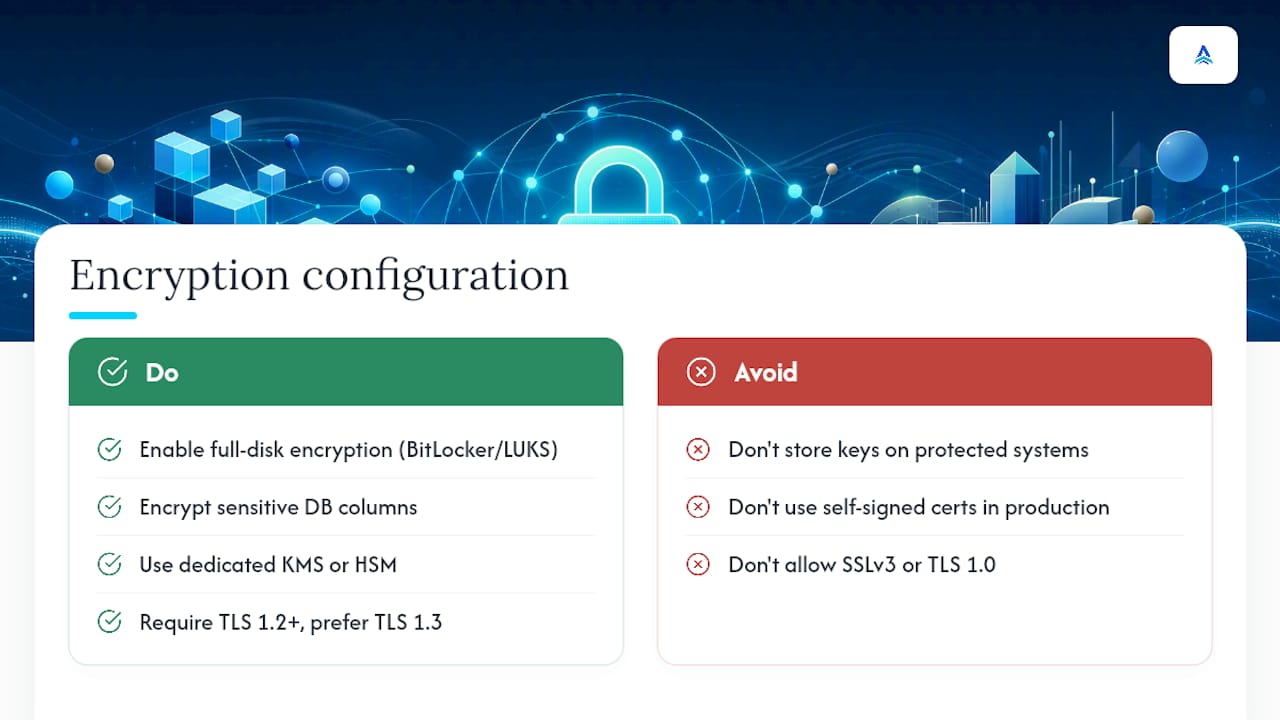
For data at rest, full-disk encryption belongs on every endpoint and server that can store sensitive data, using BitLocker on Windows or LUKS on Linux. Database-level encryption adds a second layer for regulated data specifically, useful when the disk-level encryption alone wouldn’t satisfy an auditor asking about column-level protection for something like Social Security numbers. Key management is the part organizations skip most often: keys stored on the same system they protect defeat the purpose, so use a dedicated key management service or hardware security module wherever the budget allows.
For data in transit, TLS 1.2 at minimum, with TLS 1.3 preferred where your applications support it, should cover every internal and external connection carrying sensitive data, including internal API calls between servers that administrators sometimes assume are “safe” because they never leave the network. Disable older protocols, SSLv3 and TLS 1.0 in particular, since both carry known weaknesses that scanners flag immediately.
Certificate management deserves its own line item. Expired certificates cause outages; self-signed certificates in production create the exact “click through the warning” habit that trains staff to ignore real warnings later. A documented certificate inventory with renewal alerts closes that gap before it becomes a 2 a.m. phone call.
Malware Protection and Endpoint Security Hardening
Traditional antivirus alone doesn’t cover modern endpoint threats, and treating it as a complete solution is one of the more common hardening gaps in SMB environments.
Endpoint Detection and Response (EDR) platforms watch behavior, not just known signatures, catching fileless malware and living-off-the-land techniques that never trigger a traditional antivirus alert. Pair EDR with application whitelisting on high-value systems, servers holding sensitive data especially, so that only explicitly approved executables can run at all. That single control stops most ransomware payloads cold, regardless of how they arrived.
Most organizations already own security controls they’re not fully using, adaptive MFA, EDR features sitting half-configured, SSL inspection turned off by default. Hardening endpoint security often means finishing the configuration on tools already purchased rather than buying something new.
Device control policies matter too: restrict USB storage devices on systems handling sensitive data, since removable media remains a straightforward way to exfiltrate data or introduce malware that bypasses network-based defenses entirely. Keep endpoint protection agents updated automatically, and verify weekly that every managed device actually reports in. An EDR agent that silently stopped reporting three weeks ago provides zero protection while still looking green on last month’s dashboard.
User Training and Awareness for Hardening Practices
Every control on this checklist can get undone by one person clicking the wrong link or disabling a “annoying” security prompt, which is why training isn’t a separate initiative bolted onto hardening. It’s part of the same program.
Focus training on the behaviors that actually intersect with your hardening controls. Staff need to understand why MFA prompts appear and how to recognize a fraudulent one, since MFA fatigue attacks specifically exploit users who’ve learned to tap “approve” reflexively. They need to know that a legitimate IT request will never ask them to disable an EDR agent or bypass a firewall rule, because social engineering increasingly targets that exact gap.
Phishing simulation, run quarterly rather than annually, keeps awareness sharp without becoming background noise employees tune out. Track results by department, not just company-wide, since a single team clicking every simulated phishing email points to a specific coaching need rather than an organization-wide failure.
Give employees a frictionless way to report something suspicious. A reporting process that takes five clicks and three form fields guarantees under-reporting; a dedicated email alias or one-click report button in the email client does not. New hire onboarding should include a walkthrough of security policy on day one, before bad habits from a previous employer have a chance to take root. Awareness training that happens once a year, disconnected from the technical controls it’s supposed to reinforce, tends to produce compliance checkboxes rather than changed behavior.
What I’d Tell You If You Only Had an Hour
If I had to pick the single biggest gap I see in hardening efforts, it’s sequencing. Teams jump straight to Windows and Linux settings before they’ve finished the inventory, which means they harden systems they know about and miss the shadow IT server nobody documented. Fix visibility first.
The second gap is treating hardening as a project instead of a program. A checklist run once and never revisited degrades within months as new hires get accounts, new software gets installed, and exceptions pile up. Success looks less like a completed spreadsheet and more like a validation scan that keeps coming back clean, quarter after quarter.
— Tyson
Where ArchiTECH Fits Into This Checklist
Working through this checklist manually across a growing fleet is exactly the kind of task that eats a small IT team’s week, every week. ArchiTECH exists to run that work continuously instead of leaving it to whoever has spare time on a Friday afternoon.
Our cybersecurity services map directly to the categories above: hardening baselines, patch cadence enforcement, centralized logging and monitoring, and compliance documentation for HIPAA, PCI, and CMMC. For teams that want to keep hardening and patching in-house but need extra hands on monitoring or help desk coverage, our managed IT services and co-managed model both plug into an existing team rather than replacing it.
The starting point for any of this is our free cybersecurity assessment. It evaluates your current environment against the exact categories in this checklist and hands back a prioritized remediation list, not a generic score. If you’re weighing whether to bring in outside help at all, our guide on choosing a managed IT provider walks through what to ask before you sign anything. Take the free assessment and find out where your baseline actually stands.
Sources
- Guide to System Hardening: Checklist & Best Practices
- Operating System Hardening Checklists
- Server Hardening Checklist for SOC 2 & NIST
FAQ
What Is the Best System Hardening Checklist to Follow?
The strongest approach adapts a recognized benchmark, CIS Benchmarks are the most common starting point, into a shorter, prioritized checklist covering accounts, network, patching, and logging rather than trying to implement every setting at once.
What Is a Hardening Checklist, Exactly?
A hardening checklist is a documented list of configuration changes, disabling unused services, enforcing MFA, restricting network access, that reduces a system’s exposed attack surface below its default state.
What Are the Recommended Guidelines for System Hardening?
Follow the most restrictive applicable guidance among vendor documentation, CIS Benchmarks, and DISA STIGs, and favor vendors that demonstrate secure-by-design and secure-by-default practices when selecting new products.
What Steps Belong on a Server Hardening Checklist?
Start with asset inventory and a baseline assessment, then move to access controls, service reduction, patch cadence enforcement, and centralized logging, validated through regular scans rather than a one-time review.
How Often Should a Hardening Checklist Be Reviewed?
Review your baseline at least annually and after any major infrastructure change; automated validation scans should run continuously to catch configuration drift between formal reviews.
Recommended
- Ransomware in New England: Why Local Businesses Are Targets
- In-House IT vs. Managed Security