Yes, zero downtime migration is achievable for most small business workloads, but only when a qualified MSP runs it with real-time replication and a phased or blue-green cutover. ArchiTECH MSP builds every migration around a readiness assessment first, then a dependency map, before anyone touches production. If you’re planning a move, the first call to make isn’t to a cloud vendor. It’s scheduling that assessment.
TL;DR:
- Dependency mapping and connectivity assessments are crucial to prevent outages and should be completed before any migration steps are taken.
- A full parallel environment with continuous sync, like blue-green or phased migrations, makes cutovers faster and reduces the risk of data loss.
- Establishing a clear rollback plan and identifying decision-makers before migration minimizes chaos during unforeseen issues.
- Prioritize vetting MSPs based on their documented cutover procedures, security controls, and real experiences, rather than just technology tools.
- Most SMB migrations take between four and twelve weeks, with dependency mapping and testing making up the majority of the timeline.
What Belongs on Your Pre-Migration Checklist?
Most migration failures trace back to two things: nobody mapped what was actually connected to what, and nobody agreed on what “success” looked like before the cutover started. Fixing both takes less time than most owners assume, but skipping them is how a weekend project turns into a week of angry phone calls.

Start with dependency mapping. You need a real inventory, not a guess: application owners, the ports and protocols each system uses, every integration endpoint, and rough data volumes per workload. This is tedious work, and it’s also the single biggest predictor of a clean cutover. Undocumented dependencies cause most SMB outages during migration, more often than bad timing or bad tools.
Then assess connectivity. Audit your actual bandwidth use, not your plan’s advertised speed, and model what peak usage looks like mid-migration. Underestimated bandwidth is a leading cause of post-migration slowdowns. Moving 2 TB over a 20 Mbps upload connection takes more than nine days. A symmetric fiber connection or a second circuit with cellular failover isn’t overkill for a cloud-dependent business. It’s table stakes.
From there, define your targets before you touch anything:
- Your availability target and acceptable Recovery Time Objective / Recovery Point Objective
- A cost guardrail so scope creep doesn’t blow the budget
- A ticket-volume threshold that tells you when something’s genuinely wrong versus expected friction
- Who inside your company has final say on go/no-go decisions
Pick your cutover style deliberately. Blue-green suits businesses that can run two full environments briefly and want an instant switch. Phased migration fits complex environments with many interdependent systems. Big-bang works only for small, low-complexity setups where a short off-hours window is truly acceptable.
Pro Tip: Write your rollback rule down before migration day, not during it. Specify exactly how long the old environment stays warm and name the one person authorized to call a rollback. Ambiguity at 2 a.m. during a failed cutover is how small problems become big ones.
Before hiring anyone, ask candidates these questions:
- What replication tools do you use, and can you show a documented cutover playbook?
- What security controls apply during the migration itself, not just after?
- Can you describe a past zero-downtime migration in detail, including what almost went wrong?
- What’s your training and help-desk plan for the first two weeks post-cutover?
If an MSP can’t answer question three with specifics, that’s worth noting. Our guide to vetting managed IT providers covers more red flags to watch for.
How Does a Zero-Downtime Cutover Actually Work?
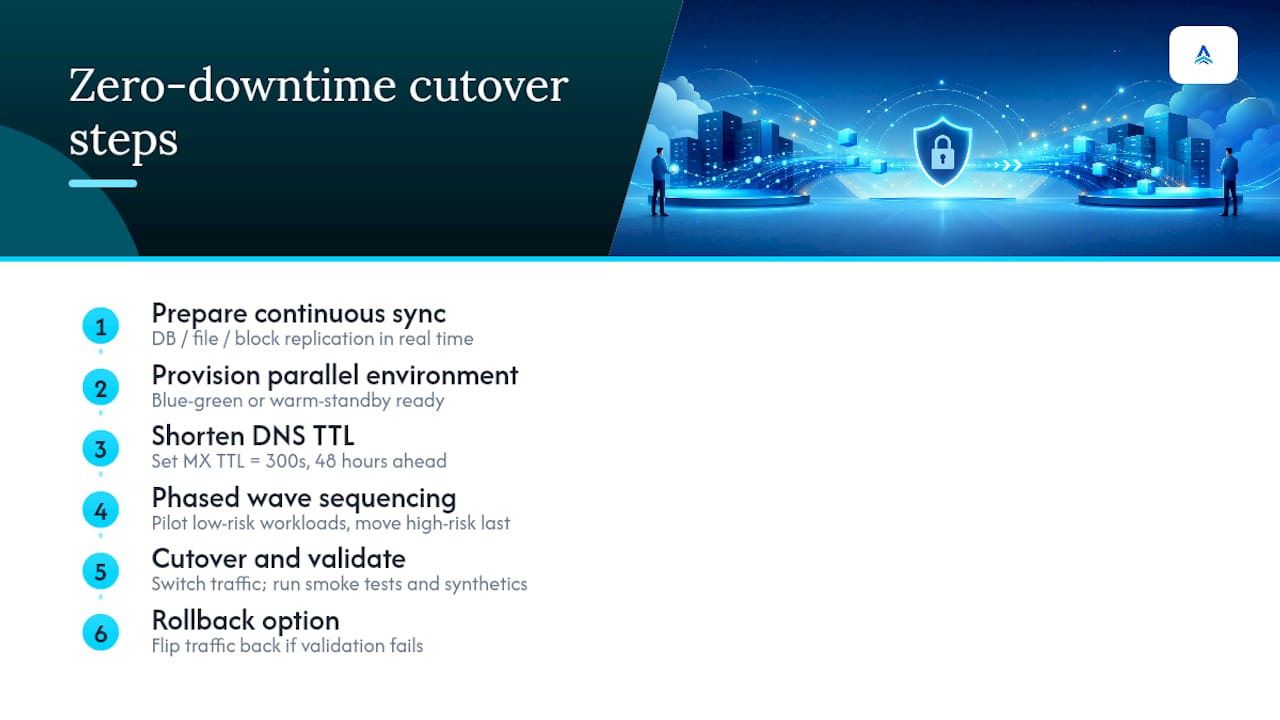
The mechanics matter because they’re what separates “we’ll try to minimize downtime” from an actual plan. Three replication approaches dominate: continuous database replication, file synchronization, and block-level replication. All three keep a copy of live data updating in near real time so the cutover moment involves switching traffic, not copying terabytes under pressure.
Blue-green and warm standby. This approach provisions a full parallel environment, syncs it continuously with production, and then shifts traffic at the DNS or load-balancer level once validation passes. If something breaks, you flip traffic back. No data recreation, no scrambling. AWS’s SMB migration guidance recommends this pattern paired with tools like AWS DMS or DataSync for exactly this reason: it turns cutover into a switch flip instead of a multi-hour event.
Phased wave migrations. Rather than moving everything at once, you sequence workloads from low-risk to high-risk. A file server with minimal integrations goes first. Your billing system, the one that touches everything else, goes last, after you’ve validated the pattern works. Diamond IT’s research on downtime-free migrations points to this staged validation, pilot first, then wider rollout, as one of the more consistent factors in clean cutovers.
DNS and TTL management deserves its own line item. Shorten your DNS time-to-live values, particularly MX records, well before cutover day. Dropping MX TTL to 300 seconds at least 48 hours ahead means email routing changes propagate in minutes instead of the 24 to 48 hours a default TTL can take. Skip this step and your cutover window balloons for reasons that have nothing to do with your actual infrastructure.
During the cutover itself, run smoke tests and synthetic transactions against the new environment before real users touch it. Automated checks that flag latency spikes or error-rate increases catch regressions faster than waiting for a support ticket. Managed database services and container platforms often make this validation easier because they expose health metrics natively, but the pattern matters more than the specific product.
What Happens if the Migration Goes Wrong?
Zero downtime doesn’t mean zero risk. It means the risk is managed with a plan that catches problems fast and reverses them faster.
- Define your rollback window before cutover. Decide how long the old environment stays warm (24 hours minimum for most SMB workloads, longer for anything touching finance or compliance) and identify the last confirmed safe state to return to.
- Name the rollback authority. One person, not a committee, decides whether to reverse the cutover. A named decision-maker measurably reduces go-live risk compared to ad hoc calls made mid-crisis.
- Monitor the right signals. Watch latency, error rate, and replication lag continuously for the first 72 hours, with a specific owner assigned to alerts.
- Verify business processes, not just uptime. Run through a finance cycle check, confirm third-party connectors still authenticate, and test the workflows your team actually uses daily.
- Hold the old environment for one full business cycle before decommissioning, if your budget allows it. That’s your safety net if a monthly process surfaces an issue uptime monitoring missed.
Pro Tip: A second internet circuit or cellular failover isn’t a luxury item during migration week. If your primary connection drops for even twenty minutes while you’re mid-cutover to a cloud workload, you’ve lost your ability to monitor or roll back. Redundant connectivity is cheap insurance against an expensive problem.
Why ArchiTECH’s Security-First Approach Reduces Migration Risk
Most MSPs treat security as a checkbox added after the migration works. ArchiTECH builds it in from the first assessment, because a migration that moves data cleanly but exposes it in transit hasn’t actually succeeded.
Every ArchiTECH engagement runs on a documented six-step security framework, applied to migration work the same way it’s applied to ongoing managed services. That consistency is deliberate: a migration is one of the highest-risk moments in a business’s IT lifecycle, and treating it as a separate, less-scrutinized project is how gaps get introduced.
A typical engagement moves through five phases:
- Readiness assessment (current-state inventory and risk review)
- Dependency mapping (the full application and data-flow inventory)
- Replication setup (continuous sync to the target environment)
- Cutover execution (blue-green or phased, based on your risk profile)
- Post-migration verification (72-hour monitoring plus formal sign-off)
A migration that hits its deadline but introduces a compliance gap or an unmonitored open port hasn’t actually succeeded. Security validation has to be part of the cutover checklist, not a follow-up project.
You can review the underlying six-step security framework in more detail.
The Part Most Migration Guides Leave Out
Here’s what I’d push back on in most migration advice you’ll find: the obsession with tooling. Replication software and cutover automation matter, but they’re rarely why migrations fail. They fail because nobody wrote down the dependency map, nobody named a rollback decision-maker, or nobody trained the front-line staff who’ll be fielding confused customer calls the morning after cutover.
The technical playbook in this article, blue-green environments, phased waves, DNS staging, is genuinely useful, and any competent MSP should execute on it. But the checklist items around it, the readiness assessment, the named owner, the two-week support plan, are what actually separate a clean migration from a chaotic one. Human factors decide outcomes more often than infrastructure choices do.
If you take one thing from this, prioritize the assessment and dependency mapping over comparing replication tools. Vet your MSP on whether they can show you a real playbook and a past example where something almost went wrong. That conversation tells you more than any spec sheet will.
— Tyson
Ready for a Migration Readiness Assessment?
Reading a checklist is one thing. Having someone map your actual environment against it is another. ArchiTECH’s free readiness assessment gives you a real inventory of your systems, a dependency map showing what’s connected to what, a proposed cutover sequence, and a defined rollback window, before you commit to a migration date.
Here’s what a typical assessment-to-cutover timeline looks like for a small or mid-sized business:
| Phase | Typical Duration | What You Get |
|---|---|---|
| Readiness assessment | 1 to 2 weeks | Full inventory, dependency map, risk review |
| Planning and connectivity check | 1 to 2 weeks | Cutover style recommendation, bandwidth plan |
| Replication and pilot | 2 to 4 weeks | Warm-standby environment, pilot migration |
| Cutover and verification | 1 week | Live cutover, 72-hour monitoring, sign-off |
Most SMB engagements complete in a few weeks to several months, depending on data volume and the number of integrations that need mapping. Before your call, pull together a rough server list, note your peak usage hours, and flag which applications your business genuinely cannot operate without. That’s enough for ArchiTECH to scope the work accurately.
You can also review managed IT services and backup and disaster recovery options if your migration includes a broader infrastructure refresh. When you’re ready, book your free readiness assessment and get a concrete plan instead of a guess.
Sources
- Cloud migration checklist — AWS Smart Business
- What Are the Most Common Cloud Migration Mistakes That Cost Small Businesses Thousands? | COMNEXIA
- Cloud Migration Without Downtime: Best Practices for Growing Businesses | Diamond IT
- Cloud Migration Planning Guide: 6 SMB Cutover Risks | Mindcore
FAQ
Is Zero Downtime Migration Really Possible for Small Businesses?
Yes, for most workloads, when an MSP uses continuous replication and a phased or blue-green cutover. Some legacy applications may still require a brief planned maintenance window rather than true zero downtime.
How Long Does a Zero-Downtime Migration Take?
Most SMB migrations run four to twelve weeks from initial assessment to completion, with dependency mapping and discovery consuming much of the early timeline.
What’s the Difference Between Blue-Green and Phased Cutovers?
Blue-green runs a full parallel environment and switches traffic all at once, suited to businesses that can support two environments briefly. Phased migration moves workloads in sequenced waves, better for complex environments with many interdependent systems.
How Long Should We Keep the Old Environment Running After Cutover?
Keep it warm for at least 24 hours as an immediate rollback option, and ideally through one full business cycle if your budget allows, so monthly processes like billing get validated before decommissioning.
What Questions Should We Ask an MSP Before Hiring Them for a Migration?
Ask what replication tools they use, whether they can show a documented cutover playbook, what security controls apply during migration, and for a specific past example, including what nearly went wrong.
Recommended
- How to Choose a Managed IT Provider in MA
- 5 Questions to Ask Before Hiring an MSP
- Backup & Disaster Recovery
- Cybersecurity Services for SMBs